Showing posts with label condor xc mini plus. Show all posts

Tuesday, 25 October 2022

(Solved) Xhorse Condor XC Mini Plus motor not spinning

Problem: My Condor XC Mini Plus, everything else works on it, the X Y Z axis also works fine and I have upgraded it to the latest version, but the motor won't spin.

condor-xc-mini-plus-motor-not-spinning-1

condor-xc-mini-plus-motor-not-spinning-2

Solution: Replace the driver board.


For more technical services, follow http://blog.obd2shop.co.uk/

Wednesday, 28 April 2021

How to Cut VW Passat Key via Xhorse Condor XC-Mini Plus?

This is a 2001-2005 Volkswagen Passat door lock, today I’ll use the Xhorse Condor XC-Mini Plus key cutting machine to cut a key for it. 


Have been dismantled and decoded Passat lock, here we go to cut the key directly.


Press on XC-Mini Plus tablet screen, 

Key duplication >> Volkswagen >> Passat >> B5.5 - Typ 3B / 3BG(2001-2005) >> Confirm

cut-vw-passat-key-via-xhorse-condor-xc-mini-plus-(1)

cut-vw-passat-key-via-xhorse-condor-xc-mini-plus-(2)

Input the 8 bitting codes: 33112334

Fix the key blank flat on the clamp.

This time I’m using an emergency plastic key blank, so press “Cut Key Plastic”. Otherwise, press “Cut” for common metal key blank.

Condor XC-Mini machine starts cutting...

As you can see, it is cutting very neat.

Wait until cutting completed.

Clean the iron scraps, and take out the key to have a try.

Alright, it fits the lock and can open it.

cut-vw-passat-key-via-xhorse-condor-xc-mini-plus-(3)

cut-vw-passat-key-via-xhorse-condor-xc-mini-plus-(4)

Using Condor XC-Mini Plus Automatic Machine to cut a key for VW Passat 2001-2005 is successful!

https://www.obd2shop.co.uk/


Monday, 12 April 2021

Xhorse Condor XC-Mini Plus Copy a Key for Ford Focus(2011-)

How to use Xhorse Condor XC-Mini Plus key cutting machine to copy a key for Ford Focus(2011-)? 

Prepare an original key & a key blank to be cut.

Fix original key on clamp, keep it flat.


Press on Condor XC-Mini tablet screen, 

Key duplication >> Ford >> Focus >> Aus / Euro - LW(after 2011) >> Select key type, press “Confirm”>> Key decode

xhorse-condor-xc-mini-plus-copy-a-key-for-ford-focus-2011-1

xhorse-condor-xc-mini-plus-copy-a-key-for-ford-focus-2011-2

xhorse-condor-xc-mini-plus-copy-a-key-for-ford-focus-2011-3

xhorse-condor-xc-mini-plus-copy-a-key-for-ford-focus-2011-4

xhorse-condor-xc-mini-plus-copy-a-key-for-ford-focus-2011-5

xhorse-condor-xc-mini-plus-copy-a-key-for-ford-focus-2011-6

No parameters need to adjust, press “Confirm”.


The XC-Mini machine starts decoding...


Remove the original key and fix a key blank instead when the machine stopped.


Press “Cut”.

The XC-Mini machine starts cutting...


Wait until cutting finished.

Clean the iron scraps and take out the key.


It is the same key bitting as the screen, and it can open lock normally.

Key cutting was done!

xhorse-condor-xc-mini-plus-copy-a-key-for-ford-focus-2011-7

xhorse-condor-xc-mini-plus-copy-a-key-for-ford-focus-2011-8

xhorse-condor-xc-mini-plus-copy-a-key-for-ford-focus-2011-9

xhorse-condor-xc-mini-plus-copy-a-key-for-ford-focus-2011-10

xhorse-condor-xc-mini-plus-copy-a-key-for-ford-focus-2011-11

This is using Condor XC-Mini Plus automatic machine to cut a key for Ford Focus(2011-) successfully.

https://www.xhorse.co.uk/

Monday, 15 March 2021

Xhorse Condor XC-Mini Cut Toyota TOY43 Key When All Keys Lost

How to use Xhorse Condor XC-Mini Plus key cutting machine to cut a TOY43 key for Toyota when all key lost? Today I wanna cut by bitting to finish the job.

Having calculated Toyota key buttings from lock, here we go to start.

xhorse-condor-xc-mini-cut-toyota-toy43-key-all-key-lost-1

Press on Condor XC-Mini tablet screen:

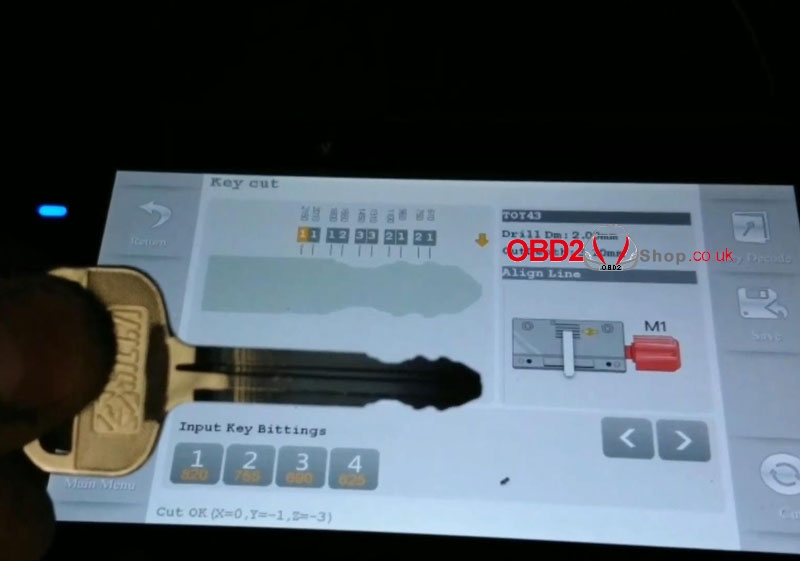
Cut by bitting >> TOY43

Select key type:

Key ID: 940

Key width: 820

Cuts: 10

Cut depth: 0.00mm

Car maker: Toyota

xhorse-condor-xc-mini-cut-toyota-toy43-key-all-key-lost-2

xhorse-condor-xc-mini-cut-toyota-toy43-key-all-key-lost-3

xhorse-condor-xc-mini-cut-toyota-toy43-key-all-key-lost-4

Input cut bittings: 12332121

Fix the key blank on clamp, make it flat and tight.

Press “Cut”, XC-Mini machine starts cutting...

xhorse-condor-xc-mini-cut-toyota-toy43-key-all-key-lost-5

xhorse-condor-xc-mini-cut-toyota-toy43-key-all-key-lost-6

xhorse-condor-xc-mini-cut-toyota-toy43-key-all-key-lost-7

xhorse-condor-xc-mini-cut-toyota-toy43-key-all-key-lost-8


Take out the key when cutting finished.

It is with same bittings as TOY43 on screen, also, it can open the Toyota lock.

Done!

xhorse-condor-xc-mini-cut-toyota-toy43-key-all-key-lost-9

xhorse-condor-xc-mini-cut-toyota-toy43-key-all-key-lost-10

Using Condor XC-Mini Plus automatic machine to cut a Toyota TOY43 key by bitting successfully!

http://blog.obd2shop.co.uk/xhorse-condor-xc-mini-cut-toyota-toy43-key-all-key-lost/


Thursday, 29 August 2019

CONDOR XC-MINI PLUS User Manual: Operation instructions

Here is the CONDOR XC-MINI PLUS user manual: operating instructions that provide you to use the machine correctly and safely.

Part 1: Height level adjustment

1. Enter the main interface and click on 'Self Test'.

how-to-use-condor-xc-mini-plus-01

2. Click on 'Height Level Adjustment '.

how-to-use-condor-xc-mini-plus-02

3. Adjust the height of the cutter and probe by following the tips on the screen, then click on 'Continue' to the step of adjustment.

how-to-use-condor-xc-mini-plus-03


4. After the machine stopped, please follow the screen tips, adjust the probe, let it at the same height with the cutter, then 'Continue'.

how-to-use-condor-xc-mini-plus-04

5. Select the correct diameter of the cutter and confirm it.
how-to-use-condor-xc-mini-plus-05

Part 2: Clamp calibration

1. Enter main interface and click on ' Self Test'.
how-to-use-condor-xc-mini-plus-06

2. Click on 'Clamp Calibration'.
how-to-use-condor-xc-mini-plus-07

3. Select clamp M1 and proceed by following the tips on the screen.
how-to-use-condor-xc-mini-plus-08

4. Please put the HON66 key blank according to the screen, then tighten the clamp, click on'Continue', calibration finished.
how-to-use-condor-xc-mini-plus-09

5. Enter clamp M2 calibration, rotate side A upward and do not put any keys on the clamp.
how-to-use-condor-xc-mini-plus-10

6. Follow the tips on the screen, rotate side B, C, D upward one by one to calibration
until M2 clamp calibration finished.

how-to-use-condor-xc-mini-plus-11

More Operation instructions please refer to http://www.obd2shop.co.uk/upload/pro/19082215664575917376.pdf