Showing posts with label xhorse dolphin. Show all posts

Wednesday, 13 May 2026

How to Update Xhorse Dolphin XP-005: 2026 Firmware & Database Guide

To maintain peak performance and access the latest vehicle support, you must regularly update your Xhorse Dolphin XP-005. You can perform updates directly via the mobile app for database synchronization or use a PC-based Upgrade Kit for comprehensive firmware and database maintenance. Keeping the software current ensures precision cutting and hardware stability. 


Method 1: Online Database Update (Mobile App)

This is the fastest way to sync the latest key codes and vehicle data using your smartphone. 

(1) Access Update Menu: Enter the Dolphin XP-005 main interface and click 'Update'. 

(2) Select Database: Click on 'Database update'. 

(3) Download & Install: If a new version is detected, click 'Update' to download. 

(4) Confirm Success: Click on 'OK' after the database download is successful. 

Note: If connected via mobile data, a prompt will warn about potential fees; downloading via WiFi is recommended. 

how-to-update-xhorse-dolphin-xp-005-2026-firmware-database-guide-1

Method 2: Firmware & Database Update (Upgrade Kit)

Use this method for major system improvements and firmware stability. 

1. Obtain the Upgrade Kit

You can acquire the necessary update package through three channels:

Distributor: Contact your distributor and ask for the 'Upgrade Kit'. 

Email Support: Send an email titled 'update tool' to support@xhorse.com. 

Xhorse App: Consult with online customer service on the Xhorse App. 


2. Execution Steps

(1) Connect Device: Connect the Dolphin with a computer through a USB cable. Run 'Upgrade Kit>>Find Device'. 

(2) Recognition: The connected device will be recognized and shown in the left corner. 

(3) Driver Installation: If the device is not found, follow the on-screen tips and click 'Yes' to install the driver. 

(4) Select Model: Select 'DOLPHIN1' and complete the driver installation. 

(5) Execute Upgrade: When the machine is found, click 'Upgrade'. 

(6) Finalize: It takes a few minutes to complete; ensure the USB cable remains well connected throughout.

how-to-update-xhorse-dolphin-xp-005-2026-firmware-database-guide-2

how-to-update-xhorse-dolphin-xp-005-2026-firmware-database-guide-3

how-to-update-xhorse-dolphin-xp-005-2026-firmware-database-guide-4

how-to-update-xhorse-dolphin-xp-005-2026-firmware-database-guide-5

how-to-update-xhorse-dolphin-xp-005-2026-firmware-database-guide-6

how-to-update-xhorse-dolphin-xp-005-2026-firmware-database-guide-7

www.obd2shop.co.uk

Monday, 10 January 2022

LISHI + Xhorse Dolphin XP005 Decode & Cut VW HU66 AKL

Use LISHI 2-in-1 Auto Pick working with Xhorse Dolphin XP005 can easily decode & cut a VW HU66 key when all keys lost. As long as you have a car lock, the LISHI decoder can extract it for cutting a new key.


Following this, I’m gonna demonstrate how to do it.


Decode Key

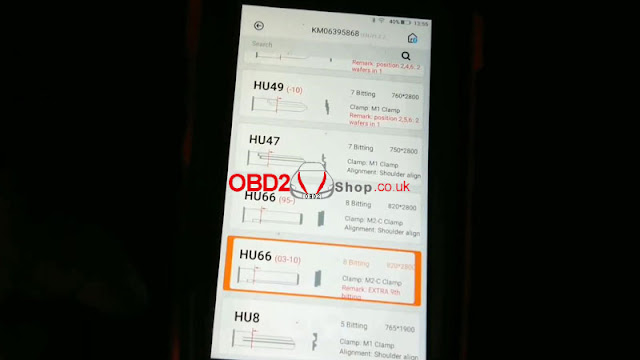
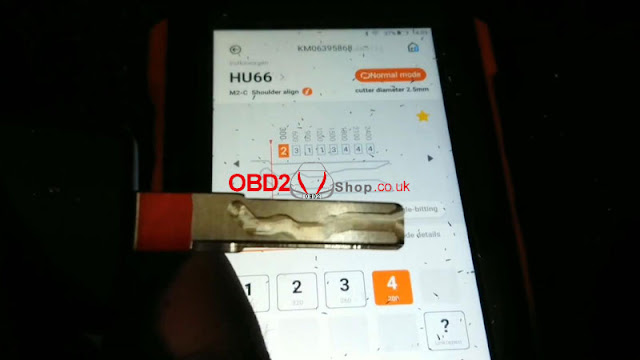
Firstly it needs to connect with the Dolphin XP005 machine via the Xhorse app or VVDI Key Tool MAX programmer. Enter into

Vehicle database >> Volkswagen >> All key blank >> HU66

lishi-xhorse-dolphin-xp005-decode-cut-vw-hu66-akl-1

lishi-xhorse-dolphin-xp005-decode-cut-vw-hu66-akl-2

lishi-xhorse-dolphin-xp005-decode-cut-vw-hu66-akl-3


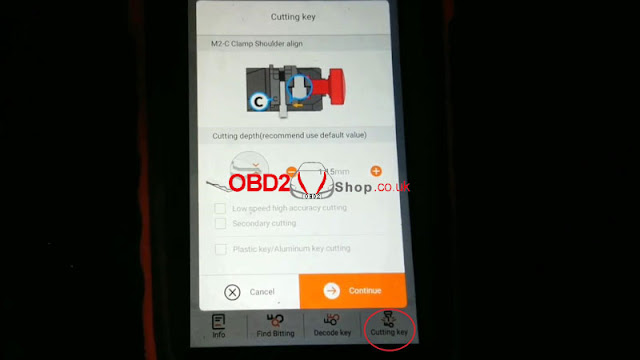
M2-C clamp shoulder align.

Install key blank as prompted.


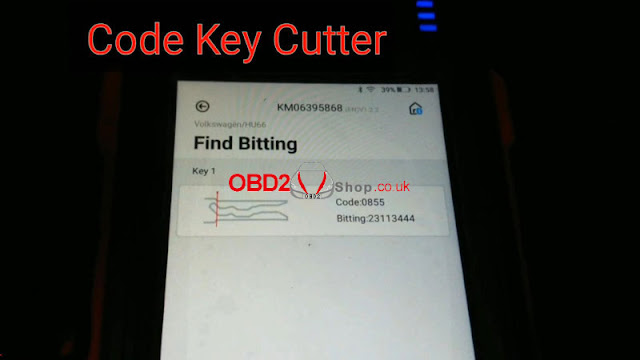
Input the codes decoded by LISHI: 23113444

Press “Find Bitting”.

A key type was displayed with code 0855, that’s it!

lishi-xhorse-dolphin-xp005-decode-cut-vw-hu66-akl-4

lishi-xhorse-dolphin-xp005-decode-cut-vw-hu66-akl-5

lishi-xhorse-dolphin-xp005-decode-cut-vw-hu66-akl-6

Cut Key

Cutting key >> Continue

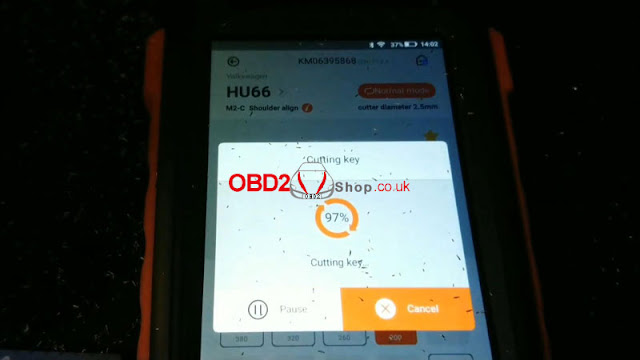
Dolphin XP005 will work automatically on command.

Just wait until 100%...

Cutting key completed.


Clean & turn over key to cut the other side.

Repeat same command as before.

Either Key Tool MAX or Xhorse Dolphin screen can show the cutting progress.

100% again, completed!

lishi-xhorse-dolphin-xp005-decode-cut-vw-hu66-akl-7

lishi-xhorse-dolphin-xp005-decode-cut-vw-hu66-akl-8

lishi-xhorse-dolphin-xp005-decode-cut-vw-hu66-akl-9

lishi-xhorse-dolphin-xp005-decode-cut-vw-hu66-akl-10

Let’s take it out to have a try.

It can open the lock.

Done!

lishi-xhorse-dolphin-xp005-decode-cut-vw-hu66-akl-11

lishi-xhorse-dolphin-xp005-decode-cut-vw-hu66-akl-12

It’s said new tool Xhorse Key Reader also supports decoding keys with ease. But it does not work for all keys lost, a key is a must-have. Believe having those tools can help locksmiths much.

http://blog.obd2shop.co.uk/lishi-xhorse-dolphin-xp005-decode-cut-vw-hu66-akl/

Wednesday, 27 October 2021

Xhorse Key Reader 7 FAQs You Should Know

The latest key identification device Xhorse Key Reader has been released and can be pre-ordered now! Check the frequently asked questions and answers below to find what it can do.


Why Xhorse develop Key Reader?

3 significant features:

1. It’s able to identify aluminum keys, plastic keys as well as metal keys. It’s a bit troublesome to get the bitting code, so Key Reader greatly compensates for that. 

2. Probe breaking can be avoided. 

3. It’s much more accurate than taking a photo to identify key data.

xhorse-key-reader-7-faqs-you-should-know-1

xhorse-key-reader-7-faqs-you-should-know-2


Will Xhorse Key Reader work on APP?

Yes. 

1. Use a smartphone + key cutting machines like Dolphin XP005. By smartphone, you can obtain key bitting, then cut with the machine.

2. Use a key cutting machine with a screen like Condor XC-MINI Plus or Dolphin IIXP-005L. In this way, you can directly cut the key with simple clicks on the machine.

xhorse-key-reader-7-faqs-you-should-know-3

Dose Xhorse Key Reader support edge cut keys?

Yes. Just insert the key and click “Identification” on the screen. Key Reader will identify the key bitting codes automatically and show all key details.

xhorse-key-reader-7-faqs-you-should-know-4

xhorse-key-reader-7-faqs-you-should-know-5

xhorse-key-reader-7-faqs-you-should-know-6


Dose Xhorse Key Reader identifies HU162T?

Yes. HU162T is mainly for VW, Audi, Seat, Skoda cars. Though it’s a special metal key with 3 sides. For sure Key Reader Blade Skimmer is able to identify it.

xhorse-key-reader-7-faqs-you-should-know-7


Does Xhorse Key Reader identify Honda keys?

Definitely yes. It’s acknowledged that Honda keys tend to wear off easily. Yet you can still acquire accurate key bitting results.

xhorse-key-reader-7-faqs-you-should-know-8

Does Xhorse Key Reader support plastic/aluminum keys?

Sure. That’s the biggest advantage of the tool.

xhorse-key-reader-7-faqs-you-should-know-9

xhorse-key-reader-7-faqs-you-should-know-10

How much is it and when will it be available?

The pre-order price is £265, will arrive and deliver in December.

Order link: https://www.obd2shop.co.uk/wholesale/xhorse-key-reader.html


More questions welcome to contact us.

www.obd2shop.co.uk


Sunday, 30 May 2021

How to Copy a 2014 Nissan Versa Key via Xhorse Dolphin XP005?

How to use Xhorse Dolphin XP005 Key Cutting Machine to duplicate a 2014 Nissan Versa NSN14 key? Now I’m gonna make a quick demo to show the steps.


First of all, it requires an original key & a key blank.

Fix the original key flat on the M1 clamp.

copy-a-2014-nissan-versa-key-via-xhorse-dolphin-xp005-01

copy-a-2014-nissan-versa-key-via-xhorse-dolphin-xp005-02

Open Xhorse app to connect Dolphin XP005 via Bluetooth, press

Vehicle database >> Nissan >> Versa >> E12(After 2013) >> NSN14 >> OK


Install M1 clamp tip align position 4. 

This type recommends use 1.5mm to cut.


Decode key >> Continue

copy-a-2014-nissan-versa-key-via-xhorse-dolphin-xp005-03

copy-a-2014-nissan-versa-key-via-xhorse-dolphin-xp005-04

copy-a-2014-nissan-versa-key-via-xhorse-dolphin-xp005-05

copy-a-2014-nissan-versa-key-via-xhorse-dolphin-xp005-06

Dolphin XP005 machine starts to decode...

(The duplicator will check to make sure alignment and position are good before cutting if you get an error, adjust and retry.)


Decode key success.

It will tell the bitting codes of the original key, confirm if the cut matches the original key.

If it is correct, remove the original one to insert the key blank on the M1 clamp.


Press cut to duplicate.

Dolphin XP005 machine starts cutting key...

copy-a-2014-nissan-versa-key-via-xhorse-dolphin-xp005-07

copy-a-2014-nissan-versa-key-via-xhorse-dolphin-xp005-08

copy-a-2014-nissan-versa-key-via-xhorse-dolphin-xp005-09

Wait for processing until 100%.

Cutting key complete!

Brush off the new key and take it out to have a test.


It looks pretty good, it can switch the ignition.

2014 Nissan Versa NSN14 key duplication is successful!

copy-a-2014-nissan-versa-key-via-xhorse-dolphin-xp005-10

copy-a-2014-nissan-versa-key-via-xhorse-dolphin-xp005-11

Key cutting is simple and easy with the Xhorse app &Dolphin XP005 Automatic Machine.

https://www.obd2shop.co.uk/


Tuesday, 23 March 2021

Xhorse Dolphin XP005 Cuts a Honda RSX Key when All Key Lost

How to use the Xhorse Dolphin XP005 key cutting machine to make a Honda RSX key when all keys lost? Here is a quick demonstration I’ll show you.

Tools

A LISHI HON42/41 key reader

A Dolphin XP005 machine

A key blank to be cut

A smartphone installed with the Xhorse app


After calculation, the key bitting codes are: 11332312.

xhorse-dolphin-xp005-cuts-a-honda-rsx-key-when-all-key-lost-1

Procedure

Connect XP005 machine in Xhorse app, press


Customize key data >> Honda - RSX >> OK


Install M1 clamp as prompts, fix key blank flat on the clamp.

xhorse-dolphin-xp005-cuts-a-honda-rsx-key-when-all-key-lost-2

xhorse-dolphin-xp005-cuts-a-honda-rsx-key-when-all-key-lost-3

xhorse-dolphin-xp005-cuts-a-honda-rsx-key-when-all-key-lost-4

Input key bitting codes manually, press

Cutting key >> Cut


Dolphin XP005 machine starts cutting.

xhorse-dolphin-xp005-cuts-a-honda-rsx-key-when-all-key-lost-5

xhorse-dolphin-xp005-cuts-a-honda-rsx-key-when-all-key-lost-6

xhorse-dolphin-xp005-cuts-a-honda-rsx-key-when-all-key-lost-7

xhorse-dolphin-xp005-cuts-a-honda-rsx-key-when-all-key-lost-8

Wait processing until 100%...


Process complete, press “OK”.


Clean the metal debris, and take out the key to have a test.


It can open the lock.

Key cutting has done!

xhorse-dolphin-xp005-cuts-a-honda-rsx-key-when-all-key-lost-9

xhorse-dolphin-xp005-cuts-a-honda-rsx-key-when-all-key-lost-10

This is using Dolphin XP005 automatic machine to cut a Honda RSX key when all key lost successfully!

https://www.xhorse.co.uk/