Showing posts with label vvdi key tool max. Show all posts

Thursday, 28 August 2025

Xhorse FT-OBD Mini: Toyota Key Programming Guide

In this guide, we’ll show you how to add and delete smart keys on a 2017 Toyota Camry using the Xhorse FT-OBD Mini Tool, working together with VVDI Key Tool Max or Key Tool Max Pro.


Since we have the original working key, the process is straightforward. Let’s get started.


Step 1: Connect and Enter Programming Menu

1. Connect the Toyota Mini Tool to the vehicle’s OBD port.

2. On the VVDI Key Tool Max / Max Pro, navigate to:


Select from Model → Camry → Keyless Go → 2013–2017 →

Type 1 (8A – Page P4 88) → Step 3 – Adding Keys → Start Execute → Clear Smart Keys


Step 2: Clear Existing Smart Keys

Follow the on-screen instructions:

Turn the ignition ON (instrument panel lights up).

The system will display:

Number of registered keys: 1

Number of keys remaining to be registered: 6

Press OK.


Next:

Touch the IGNITION (IG) switch with a registered key (logo side facing the switch).

Complete the operation within 30 seconds after pressing OK.


Once finished, you’ll see:

Clear completed!


xhorse-ft-obd-mini-toyota-key-programming-guide-1

xhorse-ft-obd-mini-toyota-key-programming-guide-2

xhorse-ft-obd-mini-toyota-key-programming-guide-3

xhorse-ft-obd-mini-toyota-key-programming-guide-4

xhorse-ft-obd-mini-toyota-key-programming-guide-5

xhorse-ft-obd-mini-toyota-key-programming-guide-6

Step 3: Add a New Smart Key

Now select "Add Smart Keys."

1. Turn the ignition ON again.

2. Press OK.

3. Within 30 seconds, touch the IG switch with a registered key using the marked surface.

The system will display:

Key detected, programming…

Keep the key touching the ignition switch.

Wait until the registration process is fully completed.


After successful programming:

Number of registered keys: 2

Number of keys remaining to be registered: 5

The matching is completed.


xhorse-ft-obd-mini-toyota-key-programming-guide-7

xhorse-ft-obd-mini-toyota-key-programming-guide-8

xhorse-ft-obd-mini-toyota-key-programming-guide-9

Final Check

1. Turn the ignition OFF.

2. Test both smart keys:

Remote functions work normally

Vehicle starts successfully

Key adding and deletion completed.


www.obd2shop.co.uk

Thursday, 1 December 2022

VVDI Key Tool MAX has an error in programming XEDS01EN Super Remote

Customer Problem: When I use the VVDI Key tool max to program XEDS01EN DS Style Super Remote, I get this message:

vvdi-key-tool-max-remote-program-error

Solution: Try to update VVDI Key Tool Max to the latest version.


Customer Feedback: It works, thanks!


To learn more about Xhorse Key Tool Max, please follow http://blog.obd2shop.co.uk/

Sunday, 17 April 2022

How to Combine & Activate Account on Xhorse Key Reader?

Xhorse Key Reader XDKR00GL is able to identify aluminum keys, plastic keys and metal keys in seconds. Supports to be controlled on a smart phone or working with VVDI Key Tool MAX or VVDI Key Tool Plus Pad. This is a guide to use Key Reader including 2 parts: combine & activate account, identify key bitting.


How to combine & activate Xhorse account?

This is taking a Hyundai KIA7 key as demonstration.

Path in Key Reader: 

Optional identification >> Hyundai >> All key blank >> KIA7 >> OK >> Connect

combine-activate-account-on-xhorse-key-reader-1

combine-activate-account-on-xhorse-key-reader-2


Turn on "Automatic connect" button to connect device.

Start to set >> Send

Wait for the security codes, then enter.

Note:

1. After combine device to account, this device's bonus points will share to account.

2. Parts of function support to share to different devices in this account.


Press "Combine device".

Combined success.

Xhorse Key Reader will process to activate automatically.

Device activation success.

combine-activate-account-on-xhorse-key-reader-3

combine-activate-account-on-xhorse-key-reader-4

How to identify key?

Now you can start to identify keys.

Press "Start to use" to go on.


Operation Steps:

1. Insert key into Key Reader key slot.

2. Continuous press twice: Identification >> identification

Key Reader will finish reading in seconds.

* If the bitting doesn't match, adjust with the keypad below.

combine-activate-account-on-xhorse-key-reader-5

combine-activate-account-on-xhorse-key-reader-6

As long as connecting with Xhorse Key Cutting Machine, you can continue to cut key here by pressing "To cut" directly.

http://blog.obd2shop.co.uk/how-to-combine-activate-account-on-xhorse-key-reader/


Monday, 10 January 2022

LISHI + Xhorse Dolphin XP005 Decode & Cut VW HU66 AKL

Use LISHI 2-in-1 Auto Pick working with Xhorse Dolphin XP005 can easily decode & cut a VW HU66 key when all keys lost. As long as you have a car lock, the LISHI decoder can extract it for cutting a new key.


Following this, I’m gonna demonstrate how to do it.


Decode Key

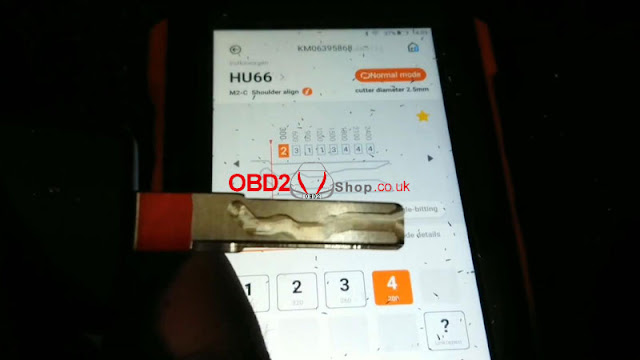
Firstly it needs to connect with the Dolphin XP005 machine via the Xhorse app or VVDI Key Tool MAX programmer. Enter into

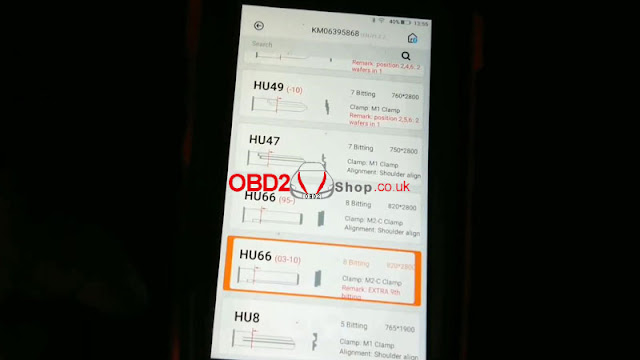
Vehicle database >> Volkswagen >> All key blank >> HU66

lishi-xhorse-dolphin-xp005-decode-cut-vw-hu66-akl-1

lishi-xhorse-dolphin-xp005-decode-cut-vw-hu66-akl-2

lishi-xhorse-dolphin-xp005-decode-cut-vw-hu66-akl-3


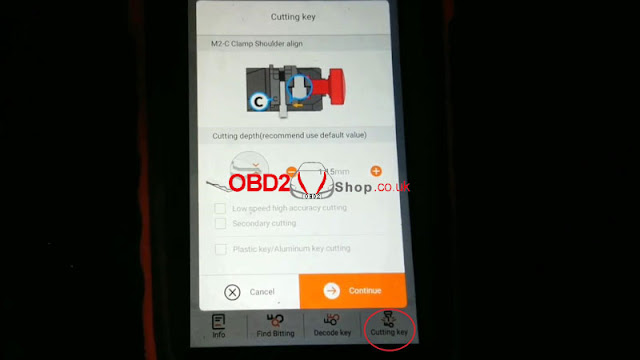
M2-C clamp shoulder align.

Install key blank as prompted.


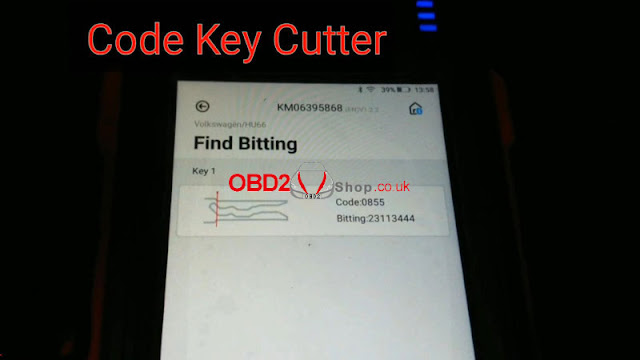
Input the codes decoded by LISHI: 23113444

Press “Find Bitting”.

A key type was displayed with code 0855, that’s it!

lishi-xhorse-dolphin-xp005-decode-cut-vw-hu66-akl-4

lishi-xhorse-dolphin-xp005-decode-cut-vw-hu66-akl-5

lishi-xhorse-dolphin-xp005-decode-cut-vw-hu66-akl-6

Cut Key

Cutting key >> Continue

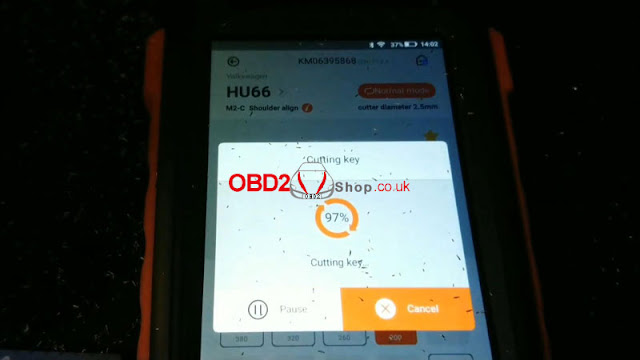
Dolphin XP005 will work automatically on command.

Just wait until 100%...

Cutting key completed.


Clean & turn over key to cut the other side.

Repeat same command as before.

Either Key Tool MAX or Xhorse Dolphin screen can show the cutting progress.

100% again, completed!

lishi-xhorse-dolphin-xp005-decode-cut-vw-hu66-akl-7

lishi-xhorse-dolphin-xp005-decode-cut-vw-hu66-akl-8

lishi-xhorse-dolphin-xp005-decode-cut-vw-hu66-akl-9

lishi-xhorse-dolphin-xp005-decode-cut-vw-hu66-akl-10

Let’s take it out to have a try.

It can open the lock.

Done!

lishi-xhorse-dolphin-xp005-decode-cut-vw-hu66-akl-11

lishi-xhorse-dolphin-xp005-decode-cut-vw-hu66-akl-12

It’s said new tool Xhorse Key Reader also supports decoding keys with ease. But it does not work for all keys lost, a key is a must-have. Believe having those tools can help locksmiths much.

http://blog.obd2shop.co.uk/lishi-xhorse-dolphin-xp005-decode-cut-vw-hu66-akl/

Wednesday, 15 September 2021

Programming Lexus 570 2012 Key by VVD MAX + Obdstar X300 Pro4

How to unlock & add smart key for a Lexus 570 2012? This is using Xhorse VVDI Key Tool Max and Obdstar X300 Pro4 to do it.


  • VVDI Key Tool Max Unlock Lexus 570 Key

Put the new Lexus key into the VVDI Key Tool Max coil slot, press

Special function >> Unlock Toyota smart key >> Unlock

Unlock OK.

VVDI Key Tool Max Unlock Lexus 570 Key


  • Obdstar X300 Pro4 Program Lexus Key 570 Key

Connect X300 Pro4 with car OBD, press

Diag program >> Toyota Lexus >> Toyota/ Lexus V32.20 >> Select from type >> Proximity >> Type 1 >> Program smart key


Note: each procedure has to complete within the specified time.


Put a working key close to ignition switch, and turn it ON till the dashboard is lit on.

You’ll hear buzzer beeps once.

Obdstar X300 Pro4 Program Lexus Key 570 Ke 01

 Obdstar X300 Pro4 Program Lexus Key 570 Ke 02

 Obdstar X300 Pro4 Program Lexus Key 570 Ke 03

Use a new smart key to contact START button.

Program success.


Test the keys, both can work well.

Key programming has done!

Obdstar X300 Pro4 Program Lexus Key 570 Ke 05

 Obdstar X300 Pro4 Program Lexus Key 570 Ke 06

Use VVDI Key Tool Max working with Obdstar Key Master 5 to unlock & program a new key for 2012 Lexus 570 successfully.

http://blog.obd2shop.co.uk/xhorse-key-tool-max-obdstar-x300-pro4-unlock-add-lexus-570-2012-key/


Wednesday, 4 August 2021

Generate Super Chip ID47 using Xhorse VVDI Key Tool Max Tutorial

Xhorse VVDI Key Tool Max is able to generate Super Chip ID47 successfully.

Generate Super Chip ID47 using Xhorse VVDI Key Tool Max 01


Put the super chip ID47 into the coil of VVDI Key Tool Max.


Tap "Generate Transponder" and then "ID47"

Generate Super Chip ID47 using Xhorse VVDI Key Tool Max 02


Tap "New 7938 chip" and then "Generate".

Generate Super Chip ID47 using Xhorse VVDI Key Tool Max 03

Generate Super Chip ID47 using Xhorse VVDI Key Tool Max 04

Detecting transponder

Generate Transponder Complete.

Generate Super Chip ID47 using Xhorse VVDI Key Tool Max 05


Then tap "ID47 Blank" and "Generate".

Generate Super Chip ID47 using Xhorse VVDI Key Tool Max 06


Detecting transponder

Generate Transponder Complete.


Back to the home menu and select "Read Transponder".

Generate Super Chip ID47 using Xhorse VVDI Key Tool Max 07


Alright, ID47 is unlocked and cloneable.

Generate Super Chip ID47 using Xhorse VVDI Key Tool Max 08


Xhorse VVDI Key Tool Max did a good job.


http://blog.xhorse.co.uk/


Wednesday, 16 June 2021

Xhorse VVDI Key Tool Max + Mini OBD Tool Program Honda City 2018 AKL

Xhorse VVDI Key Tool Max + Mini OBD Tool support to program Honda City 2018 ID47 successfully when AKL(all keys lost).


Follow the steps below to learn how to use them.


Generate Remote

Put a smart key to be programmed into VVDI Key Tool Max slot, press

Vehicle remote >> Honda >> City >> Fit(2017-2018) KeylessGo ID47 433M >> Generate remote


Burn success.

xhorse-vvdi-key-tool-max-mini-obd-tool-program-honda-city-2018-akl-01

xhorse-vvdi-key-tool-max-mini-obd-tool-program-honda-city-2018-akl-02

xhorse-vvdi-key-tool-max-mini-obd-tool-program-honda-city-2018-akl-03

Program IMMO

Plug VVDI Mini OBD Tool into OBD2 port.

Connect it with Key Tool Max, press

Immo programming >> Honda >> Select by type >> Smart key system 2 >> Start execution >> All smart keys are lost

xhorse-vvdi-key-tool-max-mini-obd-tool-program-honda-city-2018-akl-04

xhorse-vvdi-key-tool-max-mini-obd-tool-program-honda-city-2018-akl-05

xhorse-vvdi-key-tool-max-mini-obd-tool-program-honda-city-2018-akl-06

Operate according to instructions:

Put a smart key to be programmed inside the car.


Enter the number of keys to be registered, the maximum number is 6.

(I’m gonna program 2 keys, so input “2”.)


Can it operate normally to turn on the ignition switch? No


Press the START/STOP button of the engine.


Whether the ignition switch is turned on? Yes


Take all smart keys out of the car within the 90s, press “OK” to continue.

Take another key to be programmed inside the car within the 80s.

xhorse-vvdi-key-tool-max-mini-obd-tool-program-honda-city-2018-akl-07

xhorse-vvdi-key-tool-max-mini-obd-tool-program-honda-city-2018-akl-08

xhorse-vvdi-key-tool-max-mini-obd-tool-program-honda-city-2018-akl-09

xhorse-vvdi-key-tool-max-mini-obd-tool-program-honda-city-2018-akl-10

xhorse-vvdi-key-tool-max-mini-obd-tool-program-honda-city-2018-akl-11

This key registered successfully.


Please turn off the ignition switch.

Please turn on the ignition switch.


Whether indicator light is out? Yes


Please turn off the ignition switch.

Please turn on the ignition switch.


Smart key registration completed!

The matching is completed.

xhorse-vvdi-key-tool-max-mini-obd-tool-program-honda-city-2018-akl-12

Test Key

Let’s try the 2 keys, both are workable, the remote can work well.

Key programming has done!

xhorse-vvdi-key-tool-max-mini-obd-tool-program-honda-city-2018-akl-13

This is a tutorial on how to use XhorseKey Tool Max & VVDI Mini OBD Tool to program ID47 for Honda City 2018 all keys lost.

https://www.obd2shop.co.uk/