Showing posts with label vvdi super chip. Show all posts

Thursday, 26 June 2025

How to Change Super Chip Type with VVDI MINI Key Tool

The Xhorse VVDI MINI Key Tool allows for easy modification of the super chip type for XT27A01 / XT27A66 super chips without erasing data. This allows users to directly set the transponder type, making the process fast and efficient.


Supported Feature Highlights:

No chip erasing required

Direct transponder type setting

Simple operation via VVDI MINI Key Tool


How to Set VVDI Super Chip Type

Step-by-Step Instructions

1. Place the VVDI super chip into the coil area of the VVDI MINI Key Tool.

2. On the device, follow the menu path:

Mini Key Tool → VVDI Super Chip → Set as ID4C

3. Enter the required details and tap OK.

4. Once completed, the setup will be successful.

how-to-change-super-chip-type-with-vvdi-mini-key-tool-1

how-to-change-super-chip-type-with-vvdi-mini-key-tool-2

how-to-change-super-chip-type-with-vvdi-mini-key-tool-3

how-to-change-super-chip-type-with-vvdi-mini-key-tool-4

How to Change to Another Transponder Type

1. Select “Set as ID4E (ID64)” from the menu.

2. Confirm the operation.

3. The transponder type will be changed successfully.


how-to-change-super-chip-type-with-vvdi-mini-key-tool-5

Supported Transponder Types

The VVDI MINI Key Tool supports the following transponder types:

ID11

ID12

ID13

IDPCF7935

IDPCF7936

IDPCF7937

IDPCF7938

IDPCF7939

IDPCF7946

ID48

ID4C

ID4D

ID4D (80)

ID4E

ID8A

ID8C

ID8E


how-to-change-super-chip-type-with-vvdi-mini-key-tool-6

With this function, the Xhorse VVDI MINI Key Tool enables locksmiths and technicians to quickly and reliably configure VVDI super chips for various vehicle requirements.


For more professional automotive diagnostic and key programming tools, visit: www.obd2shop.co.uk.

Monday, 24 June 2024

(Solution) Xhorse chip crack failed! Error code: 13050001

This article will share the problem and solution of the Xhorse chip crack failure reported by our customer Michal Stecki.


Michal Stecki feedback:

I used vh23 Smelecom to write Xhorse chip and multi prog I have this from the screenshot

solution-xhorse-chip-crack-failed-1

Solution:

The power setting was 5 v default for 160d change for 3.3 and it reads

solution-xhorse-chip-crack-failed-2

Problem solved.

solution-xhorse-chip-crack-failed-3

For more tech support, please contact:

Whatsapp: +86 13983755934

Telephone: +86 13983755934

Wechat: +86 13983755934

Official Email: Sales@obd2shop.co.uk

Skype: OBD2Tool.co.uk


www.obd2shop.co.uk

Thursday, 9 September 2021

(Solved!)Xhorse VVDI2 Volvo 93С66 pcf7935 key 4 5 6 not available Problem

Problem: Xhorse VVDI2 Volvo V70 1998- with 93С66 and pcf7935. When loading eeprom data, free positions 4, 5 and 6 are not available for writing. How to solve this issue?

VVDI2 Volvo 93С66 pcf7935 key 4 5 6 not available


Xhorse senior engineer replied:

Just generate key from 1,2,or 3 position. No need write back data to immobox if using together with Super Chip XT27A01 XT27A66 Transponder; if using together with the original key, need to write back data to immobox.


Alright, Xhorse VVDI2 tech support: http://blog.xhorse.co.uk/


Wednesday, 4 August 2021

Generate Super Chip ID47 using Xhorse VVDI Key Tool Max Tutorial

Xhorse VVDI Key Tool Max is able to generate Super Chip ID47 successfully.

Generate Super Chip ID47 using Xhorse VVDI Key Tool Max 01


Put the super chip ID47 into the coil of VVDI Key Tool Max.


Tap "Generate Transponder" and then "ID47"

Generate Super Chip ID47 using Xhorse VVDI Key Tool Max 02


Tap "New 7938 chip" and then "Generate".

Generate Super Chip ID47 using Xhorse VVDI Key Tool Max 03

Generate Super Chip ID47 using Xhorse VVDI Key Tool Max 04

Detecting transponder

Generate Transponder Complete.

Generate Super Chip ID47 using Xhorse VVDI Key Tool Max 05


Then tap "ID47 Blank" and "Generate".

Generate Super Chip ID47 using Xhorse VVDI Key Tool Max 06


Detecting transponder

Generate Transponder Complete.


Back to the home menu and select "Read Transponder".

Generate Super Chip ID47 using Xhorse VVDI Key Tool Max 07


Alright, ID47 is unlocked and cloneable.

Generate Super Chip ID47 using Xhorse VVDI Key Tool Max 08


Xhorse VVDI Key Tool Max did a good job.


http://blog.xhorse.co.uk/


Wednesday, 12 May 2021

How to Use Xhorse VVDI Mini Key Tool?(Operation Guide)

Xhorse VVDI Mini Key Tool comes with a small size & high-speed device, which supports generating/edit/clone transponder, generate/clone remote, test frequency, activate Toyota H transponder generation...etc.


This article is an initial operation guide of main functions for beginners.

- Chip Generation

- Wireless Remote Generation

- Wired Remote Generation

- Language Change and Version View


Xhorse VVDI Mini Key Tool Tutorial:

https://www.youtube.com/watch?v=n9wX7SdCGTw


How to generate a transponder chip?

Put a VVDI Super Chip into the Mini Key Tool slot, press

Generate transponder >> Select a model, ID46 (PCF7937) >> Generate >> Complete

how-to-use-xhorse-vvdi-mini-key-tool-operation-guide-1

how-to-use-xhorse-vvdi-mini-key-tool-operation-guide-2

how-to-use-xhorse-vvdi-mini-key-tool-operation-guide-3

How to use wireless remote generation?

Put a smart key into the Mini Key Tool slot, press

Vehicle remote >> Select vehicle model, Acura >> ILX/CDX/TLX KeylessGo ID47 433M >> Generate >> Complete

how-to-use-xhorse-vvdi-mini-key-tool-operation-guide-4

how-to-use-xhorse-vvdi-mini-key-tool-operation-guide-5

how-to-use-xhorse-vvdi-mini-key-tool-operation-guide-6


How to use wired remote generation?

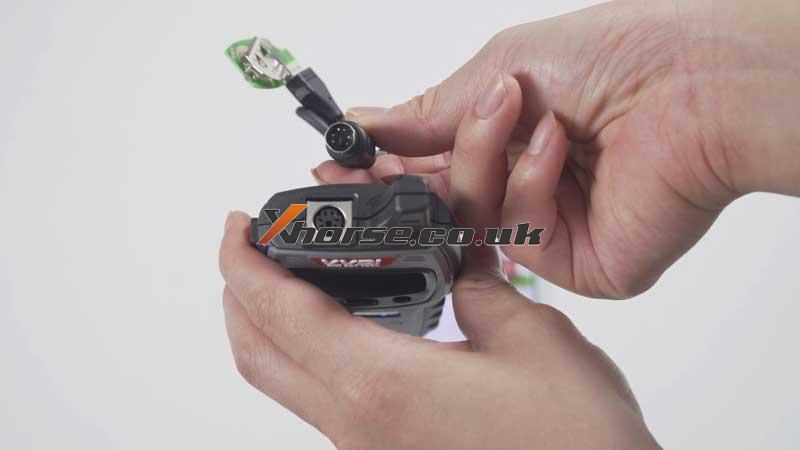
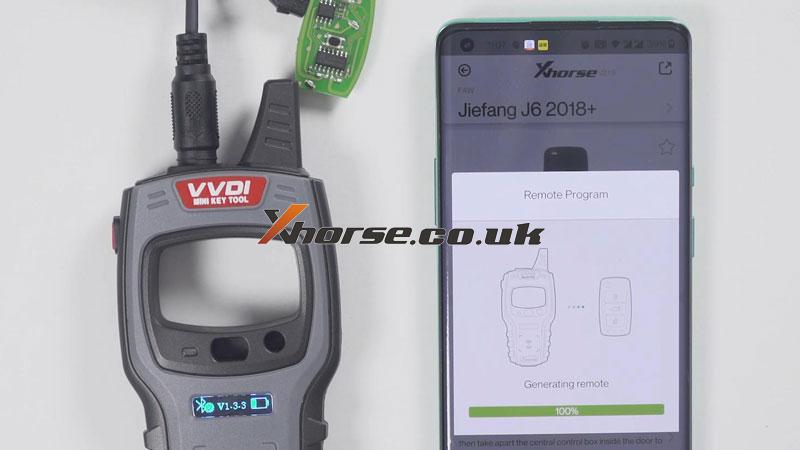
The separate outer shell of smart key, take out mainboard to connect with Mini Key Tool via cable. Press

Vehicle remote >> Select vehicle model, FAW >> Jiefang J6 2018+ >> Generate >> Complete

how-to-use-xhorse-vvdi-mini-key-tool-operation-guide-7

how-to-use-xhorse-vvdi-mini-key-tool-operation-guide-8

how-to-use-xhorse-vvdi-mini-key-tool-operation-guide-9

how-to-use-xhorse-vvdi-mini-key-tool-operation-guide-10

How to change language & view version?

Setting button on the top left corner >> Language

how-to-use-xhorse-vvdi-mini-key-tool-operation-guide-11

how-to-use-xhorse-vvdi-mini-key-tool-operation-guide-12

how-to-use-xhorse-vvdi-mini-key-tool-operation-guide-13

Device information >> View version

how-to-use-xhorse-vvdi-mini-key-tool-operation-guide-14

Any questions about the VVDI Mini Key Tool please contact us.

https://www.xhorse.co.uk/


Wednesday, 28 April 2021

Xhorse Mini Prog and VVDI Max Program VW CC 2013 Key on Bench

Today, I successfully used Xhorse Mini Prog and VVDI Key Tool Max to program VW CC 2013 Key on Bench. 

xhorse-mini-prog-vvdi-max-program-2013-vw-cc-key-01

Look at EEPROM M95320 (pressure) that is removed from the car. 

xhorse-mini-prog-vvdi-max-program-2013-vw-cc-key-02

xhorse-mini-prog-vvdi-max-program-2013-vw-cc-key-03

Prepare:

1. Use the tool to clear the chip pin. 

2. Connect the device and the adapter.

Put the adapter on the chip (press the light button to turn on the floodlight).

xhorse-mini-prog-vvdi-max-program-2013-vw-cc-key-04

Part 1. Read M95320 (pressure) EEPROM

Meanwhile, on Xhorse APP, switch to Mini Prog, and then click on "EEPROM and Flash" -> ST -> M95XXX -> M95320 (pressure) -> Read -> EEPROM -> Start Operation -> Continue -> Reading completely and save the file. 

And you can see "OK" at the back of Mini Prog. 

xhorse-mini-prog-vvdi-max-program-2013-vw-cc-key-05

xhorse-mini-prog-vvdi-max-program-2013-vw-cc-key-06

xhorse-mini-prog-vvdi-max-program-2013-vw-cc-key-07

xhorse-mini-prog-vvdi-max-program-2013-vw-cc-key-08

xhorse-mini-prog-vvdi-max-program-2013-vw-cc-key-09

xhorse-mini-prog-vvdi-max-program-2013-vw-cc-key-10

xhorse-mini-prog-vvdi-max-program-2013-vw-cc-key-11

xhorse-mini-prog-vvdi-max-program-2013-vw-cc-key-12

Part 2. Prepare dealer key

Back to Xhorse APP and switch to Keytool Max, tap "Special Function" -> Immo Data Tool -> Asia -> VW -> Passat -> Comfort ID48 - 95320 -> Start Execution ->Local file -> Mini_Prog -> M95320 (pressure) .bin -> Trying to decrypt dump buffer... -> Tick off "Key4 (Unuse)" -> Place the new VVDI Super chip into the keyhole of VVDI Max -> Prepare dealer key -> Tick off "Megamos 48" and tap "Ok" -> Ok -> Prepare dealer key success. It can start engine after writing back new dump file -> Save the new dump file. 

xhorse-mini-prog-vvdi-max-program-2013-vw-cc-key-13

xhorse-mini-prog-vvdi-max-program-2013-vw-cc-key-14

xhorse-mini-prog-vvdi-max-program-2013-vw-cc-key-15

xhorse-mini-prog-vvdi-max-program-2013-vw-cc-key-16

xhorse-mini-prog-vvdi-max-program-2013-vw-cc-key-17

xhorse-mini-prog-vvdi-max-program-2013-vw-cc-key-18

xhorse-mini-prog-vvdi-max-program-2013-vw-cc-key-19

xhorse-mini-prog-vvdi-max-program-2013-vw-cc-key-20

xhorse-mini-prog-vvdi-max-program-2013-vw-cc-key-21

Part 3. Write M95320 (pressure) EEPROM Completely 

Take VVDI Super chip out of the VVDI Max.

Back to the main menu of Xhorse APP, switch to Mini Prog menu, click on "EEPROM and Flash" -> ST -> M95XXX -> M95320 (pressure) -> Write -> EEPROM -> Start Operation -> Tap "Select" to select the write file -> Local file -> Mini_Prog -> M95320 (pressure) .bin -> Back to "Write - EEPROM - M95320 (pressure)" and meanwhile Put the adapter on the chip (press the light button to turn on the floodlight) -> Start Operation -> Continue -> Write completely and you can see "OK" at the back of Mini Prog. 

xhorse-mini-prog-vvdi-max-program-2013-vw-cc-key-22

xhorse-mini-prog-vvdi-max-program-2013-vw-cc-key-23

xhorse-mini-prog-vvdi-max-program-2013-vw-cc-key-24

xhorse-mini-prog-vvdi-max-program-2013-vw-cc-key-25

Thumb up Xhorse Mini Prog, VVDI Max, VVDI Super Chip. The whole process is smooth and pleasant.