Showing posts with label xhorse dolphin xp005. Show all posts

Friday, 10 October 2025

Xhorse Dolphin XP-005 Probe Short Circuit Troubleshooting

If your Xhorse Dolphin XP-005 displays "ERROR CODE: 57, Probe short circuit, please check probe electrical conductivity", please follow this guide. Often, cleaning the probes and performing the built-in self-test via the "Electrical Conductivity Measurement" function can resolve the issue. If the problem persists, you may need to perform the following manual inspection for abnormal conductivity in the probe and milling cutter.


dolphin-xp-005-probe-short-circuit-troubleshooting-1

Inspection Method


1. Remove the Rear Cover

Carefully separate the rear cover, paying close attention to the internal wiring harness to avoid damage.


dolphin-xp-005-probe-short-circuit-troubleshooting-2

2. Disassemble Internal Components

* Remove the Phillips screws securing the wire harness.

* Remove the rubber pellets to access the screws hidden beneath them.

* Use a HEX screwdriver to remove the long strip component.


dolphin-xp-005-probe-short-circuit-troubleshooting-3

dolphin-xp-005-probe-short-circuit-troubleshooting-4

3. Access the Z-Axis and Probe Area

* Use a flat-blade screwdriver to manually rotate the lead screw. Adjust the Z-axis until its cover is aligned horizontally.

* Once aligned, remove the Z-axis housing. Install the probe in its slot next to the housing.

* Remove the screws indicated in the guide.

* Note: Be cautious of the small conductive wire inside the probe assembly.


dolphin-xp-005-probe-short-circuit-troubleshooting-5

dolphin-xp-005-probe-short-circuit-troubleshooting-6

dolphin-xp-005-probe-short-circuit-troubleshooting-7

dolphin-xp-005-probe-short-circuit-troubleshooting-8

4. Check for Conductivity and Short Circuits

Inspect the wiring for the probe and milling cutter to check for proper conductivity or potential short circuits. This check should be performed with the wires connected to the main board. Alternatively, you can plug the main board cable back in temporarily to assist with detection.


dolphin-xp-005-probe-short-circuit-troubleshooting-9

5. Inspect the Milling Cutter Shaft and Bearing

* Loosen the two Z-axis screws. Push these screws inward until a gap appears, which allows the shaft to be removed.

* Press on the milling cutter hole position and push it upward. Observe the internal white paper disc:

* If the paper is broken, the component needs to be replaced.

* If the paper is intact, check the bearing hole for any accumulated iron scraps or debris that could cause a short.


dolphin-xp-005-probe-short-circuit-troubleshooting-10

dolphin-xp-005-probe-short-circuit-troubleshooting-11

We hope this self-inspection guide is helpful. For further assistance, please feel free to contact us.


www.obd2shop.co.uk

Wednesday, 3 September 2025

Cutting VW Beetle HU66 Keys with Xhorse Dolphin XP005

This guide shows you how to use the Xhorse Dolphin XP005 Key Cutting Machine to cut a HU66 key for a 2000 Volkswagen Beetle in an All Keys Lost (AKL) situation.


We’ll also connect the VVDI Key Tool Max with the Dolphin XP005 for operation. Alternatively, you can control the process directly via the Xhorse App installed on a smartphone.


Step 1: Select Key and Enter Code

From the main menu, select All Keys Lost → Volkswagen

Enter the key code: 0798

Select HU66, 8 bitting, 820×2800

xhorse-dolphin-xp005-cut-a-hu66-key-for-2000-vw-beetle-1

xhorse-dolphin-xp005-cut-a-hu66-key-for-2000-vw-beetle-2

xhorse-dolphin-xp005-cut-a-hu66-key-for-2000-vw-beetle-3

xhorse-dolphin-xp005-cut-a-hu66-key-for-2000-vw-beetle-4

Step 2: Set Up the Key Blank

Install the M2-C clamp with the shoulder aligned as prompted

Place the HU66 key blank flat and secure it in the clamp

Press “OK” to confirm


Step 3: Decode and Verify Bitting

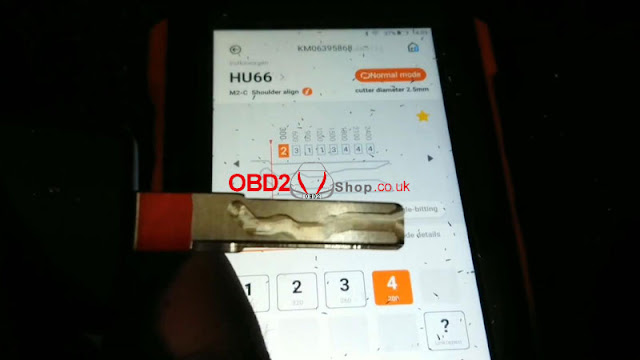
The decoded bitting code is: 22433444

Always double-check the code for accuracy before proceeding


Step 4: Begin Cutting

Select Cutting Key → Continue

The Dolphin XP005 will start cutting the first side automatically

xhorse-dolphin-xp005-cut-a-hu66-key-for-2000-vw-beetle-5

xhorse-dolphin-xp005-cut-a-hu66-key-for-2000-vw-beetle-6

xhorse-dolphin-xp005-cut-a-hu66-key-for-2000-vw-beetle-7

xhorse-dolphin-xp005-cut-a-hu66-key-for-2000-vw-beetle-8

Step 5: Flip and Cut the Second Side

Once the first side is complete, clean any metal debris

Remove the key, flip it over, and reposition it flat in the clamp

Press Cutting Key → Continue again

The machine will proceed to cut the reverse side


Step 6: Test the Key

After cutting is complete, test the key in the vehicle’s lock

The key turns smoothly and operates perfectly

xhorse-dolphin-xp005-cut-a-hu66-key-for-2000-vw-beetle-9

Done!

The HU66 key has been successfully cut for the 2000 Volkswagen Beetle using the Xhorse Dolphin XP005 key cutting machine.


www.obd2shop.co.uk


Saturday, 12 October 2024

How to use the M5 clamp on Xhorse Dolphin XP005

Customer Feedback:

Hi, I can't get the M5 clamp to work on my Dolphin XP005, I just saw it and have no choice for the M5 clamp.

how-to-use-the-m5-clamp-on-dolphin-xp005-1

how-to-use-the-m5-clamp-on-dolphin-xp005-2

how-to-use-the-m5-clamp-on-dolphin-xp005-3

Solution:

Find the path Equipment information >> Processing settings >> Cutting settings >> M5

how-to-use-the-m5-clamp-on-dolphin-xp005-4

www.obd2shop.co.uk

Tuesday, 1 November 2022

Xhorse Dolphin XP-005 Cut VW Audi HU162T Key Tutorial

Xhorse Dolphin XP-005 Key Cutting Machine supports cutting the latest HU162T key with 9/10 bittings, such as VW Golf 7 or Audi. This is a tutorial on how to cut this particular type of key.

xhorse-dolphin-xp-005-cut-vw-audi-hu162t-key-tutorial-1

xhorse-dolphin-xp-005-cut-vw-audi-hu162t-key-tutorial-2

1. Go to Cut By Bitting >> HU162T-10/ HU162T-9

Eg. Taking cut 9 bittings as an example.

xhorse-dolphin-xp-005-cut-vw-audi-hu162t-key-tutorial-3

2. Decode the front 9 bittings & select B clamp first, then continue to cut this side.

xhorse-dolphin-xp-005-cut-vw-audi-hu162t-key-tutorial-4

xhorse-dolphin-xp-005-cut-vw-audi-hu162t-key-tutorial-5

3. Return to the previous page, and select 3 bittings & D clamp. This will need another HU162T key blank to fix the key firmly. Go on to decode the key, then cut the key.

xhorse-dolphin-xp-005-cut-vw-audi-hu162t-key-tutorial-6

xhorse-dolphin-xp-005-cut-vw-audi-hu162t-key-tutorial-7

That's it!

The cutting steps apply to Dolphin II as well.

Monday, 10 January 2022

LISHI + Xhorse Dolphin XP005 Decode & Cut VW HU66 AKL

Use LISHI 2-in-1 Auto Pick working with Xhorse Dolphin XP005 can easily decode & cut a VW HU66 key when all keys lost. As long as you have a car lock, the LISHI decoder can extract it for cutting a new key.


Following this, I’m gonna demonstrate how to do it.


Decode Key

Firstly it needs to connect with the Dolphin XP005 machine via the Xhorse app or VVDI Key Tool MAX programmer. Enter into

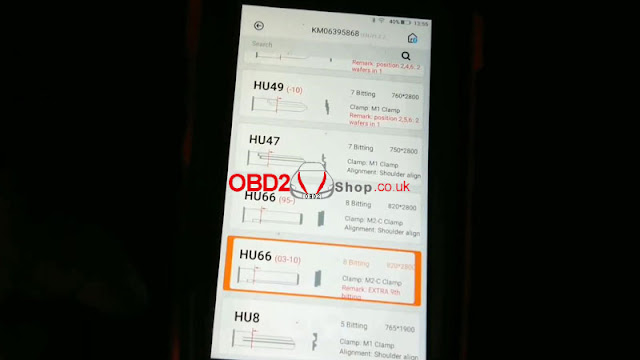
Vehicle database >> Volkswagen >> All key blank >> HU66

lishi-xhorse-dolphin-xp005-decode-cut-vw-hu66-akl-1

lishi-xhorse-dolphin-xp005-decode-cut-vw-hu66-akl-2

lishi-xhorse-dolphin-xp005-decode-cut-vw-hu66-akl-3


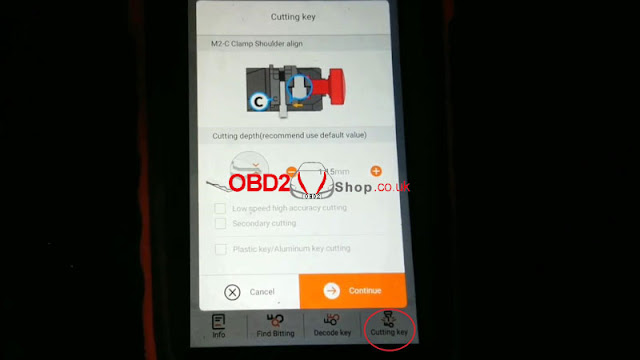
M2-C clamp shoulder align.

Install key blank as prompted.


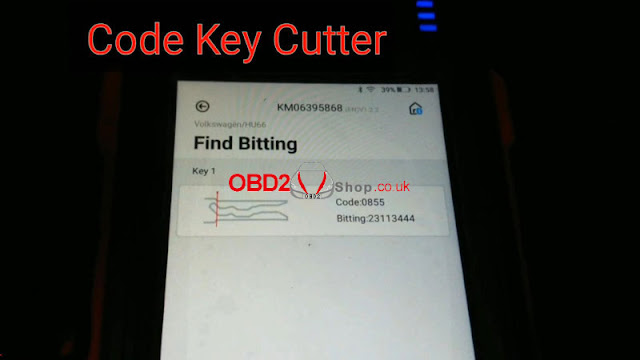
Input the codes decoded by LISHI: 23113444

Press “Find Bitting”.

A key type was displayed with code 0855, that’s it!

lishi-xhorse-dolphin-xp005-decode-cut-vw-hu66-akl-4

lishi-xhorse-dolphin-xp005-decode-cut-vw-hu66-akl-5

lishi-xhorse-dolphin-xp005-decode-cut-vw-hu66-akl-6

Cut Key

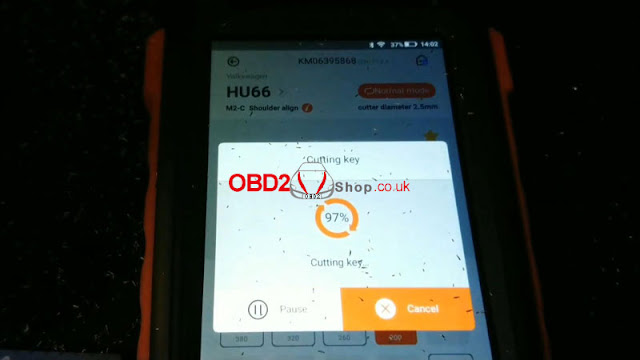
Cutting key >> Continue

Dolphin XP005 will work automatically on command.

Just wait until 100%...

Cutting key completed.


Clean & turn over key to cut the other side.

Repeat same command as before.

Either Key Tool MAX or Xhorse Dolphin screen can show the cutting progress.

100% again, completed!

lishi-xhorse-dolphin-xp005-decode-cut-vw-hu66-akl-7

lishi-xhorse-dolphin-xp005-decode-cut-vw-hu66-akl-8

lishi-xhorse-dolphin-xp005-decode-cut-vw-hu66-akl-9

lishi-xhorse-dolphin-xp005-decode-cut-vw-hu66-akl-10

Let’s take it out to have a try.

It can open the lock.

Done!

lishi-xhorse-dolphin-xp005-decode-cut-vw-hu66-akl-11

lishi-xhorse-dolphin-xp005-decode-cut-vw-hu66-akl-12

It’s said new tool Xhorse Key Reader also supports decoding keys with ease. But it does not work for all keys lost, a key is a must-have. Believe having those tools can help locksmiths much.

http://blog.obd2shop.co.uk/lishi-xhorse-dolphin-xp005-decode-cut-vw-hu66-akl/

Thursday, 24 June 2021

Xhorse Dolphin XP005 Cut Hyundai Accent HY18 When All Keys Lost

How to use Xhorse Dolphin XP005 key cutting machine to cut a Hyundai Accent HY18 key when all keys lost? Following I’ll make a quick demonstration.


Using an HY20 2 in 1 Auto Pick to decode the lock firstly.

Bitting codes were calculated: 24411222

xhorse-dolphin-xp005-cut-hyundai-accent-hy18-when-all-keys-lost-01

Connect to Dolphin XP005 machine in Xhorse app, press

Vehicle database >> Hyundai >> Accent >> HY18


Fix a key blank to be cut on M2-A clamp according to notes, press “OK”.

xhorse-dolphin-xp005-cut-hyundai-accent-hy18-when-all-keys-lost-02

xhorse-dolphin-xp005-cut-hyundai-accent-hy18-when-all-keys-lost-03

xhorse-dolphin-xp005-cut-hyundai-accent-hy18-when-all-keys-lost-04

xhorse-dolphin-xp005-cut-hyundai-accent-hy18-when-all-keys-lost-05

Input bitting codes >> Cutting key >> Cut


Dolphin XP005 machine starts cutting...

Wait cutting key process completely.


Clear scraps on the clamp, turn over the key blank to cut the other side.

Cutting key >> Cut


Dolphin XP005 restarts to cutting again...

Complete!


Let me test the new key now, it can open the lock.

Done!

xhorse-dolphin-xp005-cut-hyundai-accent-hy18-when-all-keys-lost-06

xhorse-dolphin-xp005-cut-hyundai-accent-hy18-when-all-keys-lost-07

xhorse-dolphin-xp005-cut-hyundai-accent-hy18-when-all-keys-lost-08

xhorse-dolphin-xp005-cut-hyundai-accent-hy18-when-all-keys-lost-09

xhorse-dolphin-xp005-cut-hyundai-accent-hy18-when-all-keys-lost-10

Xhorse Dolphin XP005 automatic machine is easy and smart, it only takes me 4 minutes to cut an HY18 key for Hyundai Accent.

https://www.obd2shop.co.uk/