Showing posts with label vvdi key tool plus bmw. Show all posts

Sunday, 26 March 2023

Xhorse Key Tool Plus BMW MSD87 ISN Solderless Reading on Bench

Xhorse VVDI Key Tool Plus & XDNP30 Bosch ECU Adapter have been upgraded to support reading BMW ISN code on the bench. The ECU code would be very useful when programming BMW CAS3++/CAS4+ encrypted version & FEM/BDC all keys lost. Supported types covering MSV80, MSV90, MSD80, MSD81, MSD85, MSD87, N20, N55, B38, B48, B58.

xhorse-key-tool-plus-bmw-msd87-isn-solderless-reading-on-bench-1


This is reading BMW MSD87 no soldering on the bench as a demonstration.


How to read BMW ISN with VVDI Key Tool Plus?

Immo programming >> BMW >> Select from system >> ECU ISN >> Start programming >> BENCH read ISN - MSV90/ MSV80/MSD80/MSD81/MSD85/MSD87.etc >> MSD87


Please ensure the network connection is good. Press "Yes".

Here we can check the detailed wiring diagram.

xhorse-key-tool-plus-bmw-msd87-isn-solderless-reading-on-bench-2

xhorse-key-tool-plus-bmw-msd87-isn-solderless-reading-on-bench-3

xhorse-key-tool-plus-bmw-msd87-isn-solderless-reading-on-bench-4

xhorse-key-tool-plus-bmw-msd87-isn-solderless-reading-on-bench-5

xhorse-key-tool-plus-bmw-msd87-isn-solderless-reading-on-bench-6

Connect VVDI Key Tool Plus & BMW module via XDNP30 Bosch Cable.

Supply 12V to power it on.

Press "Read" and wait for a while.

Read succeeded.

Press "OK" to save the data file.


Now Key Tool Plus is showing the VIN & ISN code.

Just remember to record it.

Done.

xhorse-key-tool-plus-bmw-msd87-isn-solderless-reading-on-bench-7

xhorse-key-tool-plus-bmw-msd87-isn-solderless-reading-on-bench-8

xhorse-key-tool-plus-bmw-msd87-isn-solderless-reading-on-bench-9

xhorse-key-tool-plus-bmw-msd87-isn-solderless-reading-on-bench-10

www.obd2shop.co.uk

Wednesday, 13 January 2021

Use VVDI Key Tool Plus to Read BMW M95256 EEPROM Data

Today, I’ll show you how to read BMW M95296 EEPROM data with Xhorse VVDI Key Tool Plus Pad.

Preparation:

8-pin socket clip adapter. 

VVDI Key Tool Plus

EEPROM

use-vvdi-key-tool-plus-to-read-bmw-m95256-eeprom-data-01

use-vvdi-key-tool-plus-to-read-bmw-m95256-eeprom-data-02

Steps:

1. Remove & clean the glue around EEPROM first.

2. Connect 8-pin socket clip adapter to EEPROM and VVDI Key Tool Plus, then fix 8-pin socket clip adapter.

3. Click “EEPROM”>> “ST”>>“M95XXX”>>“M95256(adapter)”.

use-vvdi-key-tool-plus-to-read-bmw-m95256-eeprom-data-03

use-vvdi-key-tool-plus-to-read-bmw-m95256-eeprom-data-04

use-vvdi-key-tool-plus-to-read-bmw-m95256-eeprom-data-05

use-vvdi-key-tool-plus-to-read-bmw-m95256-eeprom-data-06

4. Click “Read”>> “EEPROM”, then try to read the data.

use-vvdi-key-tool-plus-to-read-bmw-m95256-eeprom-data-07

use-vvdi-key-tool-plus-to-read-bmw-m95256-eeprom-data-08

5. Red means connection failure, so, from the picture we can see that we need to check the connection. After checking the connection, click “Try again”.

use-vvdi-key-tool-plus-to-read-bmw-m95256-eeprom-data-09

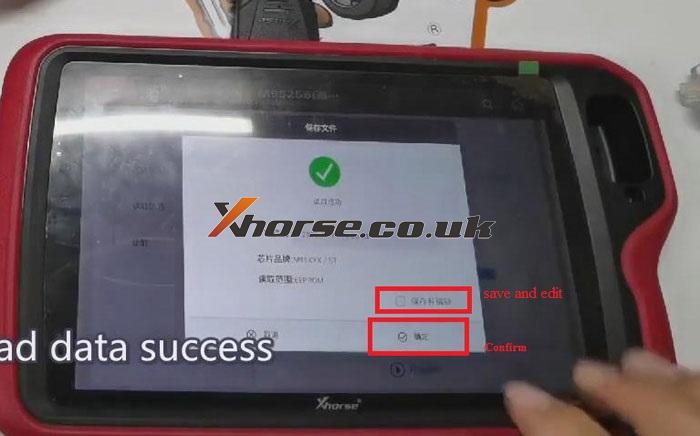
6. Now, when reading data is successful, save EEPROM file. Then we can read out EEPROM data.

use-vvdi-key-tool-plus-to-read-bmw-m95256-eeprom-data-10

use-vvdi-key-tool-plus-to-read-bmw-m95256-eeprom-data-11

http://blog.xhorse.co.uk/use-vvdi-key-tool-plus-to-read-bmw-m95256-eeprom-data/

Thursday, 7 January 2021

Renew BMW F Series Key via Xhorse VVDI Key Tool Plus

Today, I’ll show you how to renew a used BMW F series key with VVDI Key Tool Plus.

Before that, now let’s put the key into the detection coil of VVDI Key Tool Plus first.

Click “Transponder Clone”>>“Read Transponder”>>“More Parameter”, then we can see the details of the VIN number. The information on the VIN shows that the key has been programmed. And that means that if we want to reuse the key, we need to renew it.

vvdi-key-tool-plus-renews-bmw-f-series-key-01

vvdi-key-tool-plus-renews-bmw-f-series-key-02

vvdi-key-tool-plus-renews-bmw-f-series-key-03

vvdi-key-tool-plus-renews-bmw-f-series-key-04

Here are the steps for renewing the BMW F Series key:

1. Connect VVDI renew adapter with VVDI Key Tool Plus.

2. Fix the key PCB with VVDI renew adapter.

3. Click “Immo Data Tool” and select the car model, say, “BMW”.

vvdi-key-tool-plus-renews-bmw-f-series-key-05

4. Choose “BMW- F series 315MHz”>> “Unlock”.

vvdi-key-tool-plus-renews-bmw-f-series-key-06

vvdi-key-tool-plus-renews-bmw-f-series-key-07


5. When the screen shows “Unlocking is successful”, click “Generating completed”.

vvdi-key-tool-plus-renews-bmw-f-series-key-08

Please be informed: if you don’t have a renew adapter, you can use a programming cable for renewing.

Now, return to the main page, remove the key from VVDI renew adapter, and put it into the detection coil of VVDI Key Tool Plus.

Click “Transponder Clone”>>“Read Transponder”>>“More Parameter”, then we can see that the learning status of the key is new.

vvdi-key-tool-plus-renews-bmw-f-series-key-09

http://blog.xhorse.co.uk/renew-bmw-f-series-key-via-xhorse-vvdi-key-tool-plus/