Showing posts with label vvdi mini key tool. Show all posts

Wednesday, 16 July 2025

Solved: MINI Key Tool Error – "Combine SN with Xhorse App!"

Problem: When using the Xhorse VVDI MINI Key Tool to clone ID48 (96-bit), the device shows the following error message:

"Sending data file (Envio de archivo de datos): Please combine SN with Xhorse App!"

However, the SN (serial number) was already combined with the Xhorse App.


solved-mini-key-tool-combine-sn-with-xhorse-app-error-1

solved-mini-key-tool-combine-sn-with-xhorse-app-error-2

Solution:

Make sure you are logged into the same Xhorse account on the MINI Key Tool that was used to bind the serial number.

Important: Do NOT log in with a different or new account, or the error will persist.

Once you log in with the correct account, the issue will be resolved.


Technical Support:

www.obd2shop.co.uk

Thursday, 26 June 2025

How to Change Super Chip Type with VVDI MINI Key Tool

The Xhorse VVDI MINI Key Tool allows for easy modification of the super chip type for XT27A01 / XT27A66 super chips without erasing data. This allows users to directly set the transponder type, making the process fast and efficient.


Supported Feature Highlights:

No chip erasing required

Direct transponder type setting

Simple operation via VVDI MINI Key Tool


How to Set VVDI Super Chip Type

Step-by-Step Instructions

1. Place the VVDI super chip into the coil area of the VVDI MINI Key Tool.

2. On the device, follow the menu path:

Mini Key Tool → VVDI Super Chip → Set as ID4C

3. Enter the required details and tap OK.

4. Once completed, the setup will be successful.

how-to-change-super-chip-type-with-vvdi-mini-key-tool-1

how-to-change-super-chip-type-with-vvdi-mini-key-tool-2

how-to-change-super-chip-type-with-vvdi-mini-key-tool-3

how-to-change-super-chip-type-with-vvdi-mini-key-tool-4

How to Change to Another Transponder Type

1. Select “Set as ID4E (ID64)” from the menu.

2. Confirm the operation.

3. The transponder type will be changed successfully.


how-to-change-super-chip-type-with-vvdi-mini-key-tool-5

Supported Transponder Types

The VVDI MINI Key Tool supports the following transponder types:

ID11

ID12

ID13

IDPCF7935

IDPCF7936

IDPCF7937

IDPCF7938

IDPCF7939

IDPCF7946

ID48

ID4C

ID4D

ID4D (80)

ID4E

ID8A

ID8C

ID8E


how-to-change-super-chip-type-with-vvdi-mini-key-tool-6

With this function, the Xhorse VVDI MINI Key Tool enables locksmiths and technicians to quickly and reliably configure VVDI super chips for various vehicle requirements.


For more professional automotive diagnostic and key programming tools, visit: www.obd2shop.co.uk.

Monday, 8 August 2022

Renew BMW F series 868MHz Remote via VVDI Mini Key Tool

This post will show you how to use Xhorse vvdi mini key tool to renew your BMW F series 868MHz remote.


Tools you need:


VVDI Mini Key Tool

BMW F series 868MHz remote

Xhorse Remote Renew Cable

Smartphone


Step 1. Insert the remote into the mini key tool slot, select "Transponder Clone " and click "Read transponder" in the lower right corner.


bmw-f-series-remote-renew-via-mini-key-tool-01

bmw-f-series-remote-renew-via-mini-key-tool-02

You can see that the current status of the remote is "Already locked".


bmw-f-series-remote-renew-via-mini-key-tool-03

Step 2. Disassemble the BMW remote and connect it to the mini key tool via the Xhorse remote renew cable.


bmw-f-series-remote-renew-via-mini-key-tool-04

Select "Special function" → "Remote Renew" → "BMW" → "SWK49661 F Series 868MHz Continental"


bmw-f-series-remote-renew-via-mini-key-tool-05

Click "Unlock"

Renew in the process...

Renew Success.


bmw-f-series-remote-renew-via-mini-key-tool-06

Step 3. Go back to the original interface and repeat step 1.


At this point, you can see that the current status of the remote is "Unlocked".


bmw-f-series-remote-renew-via-mini-key-tool-07

Video guides:

Thursday, 29 July 2021

How to fix Xhorse VVDI Key tool "DEF" not back to normal

To fix the problem Xhorse vvdi Key tool “DEF” not back to normal likes below:

Xhorse VVDI Key tool "DEF" not back to normal 01

Xhorse VVDI Key tool "DEF" not back to normal  02

Xhorse VVDI Key tool "DEF" not back to normal  03

 
,You may try: 


Method 1. And just put it in English that returns to normal.
Method 2.Reinstall by computer, and select English language
Method 3.Reupdate and make sure there is no break in communication during update.


Good to know:

VVDI Key tool is off-production and replaced by VVDI Mini Key Tool, but they are still releasing updates.


http://blog.xhorse.co.uk/xhorse-vvdi-key-tool-def-not-back-to-normal-solution/

Thursday, 13 May 2021

Buy Xhorse vvdi mini Key Tool or lonsdor kh100

Battle: Xhorse vvdi mini key tool or lonsdor kh100, what are their Pros & cons? Aims to clone customers keys/fobs (adding the second key) also maybe if all keys lost then generating new keys.


And most locksmiths prefers to Xhorse vvdi mini Key Tool:


Review 1: 

I have Mini VVDI Key Tool and the "Superchips". These Superchips are wonderful, you can configure them as a lot of chips, you can erase them and reuse them many many times. They are perfect for tests, for expensive or hard to find chips, or if you need to do the job exactly at the moment when you don't have the exact type of chip in stock. But you can use regular chips too with VVDI Mini Key Tool.


Review 2:

I have both KH100 has nice features but the vvdi mini tool wins hand down.. you need to buy tokens for cloning ID48.


Review 3:

Vvdi mini is better. You have a unique solution with super chip xt27 from xhorse.


Can use it for all type of transponder


I use on Toyota h, id48 96bits, Id46, 4c, 4d...


It's best.


Cloning h, id48...


Renew remote, prépare remote, clone remote, test coil, test freq from remote...


And all for 130usd!!!


To be updating...


www.xhorse.co.uk


Wednesday, 12 May 2021

How to Use Xhorse VVDI Mini Key Tool?(Operation Guide)

Xhorse VVDI Mini Key Tool comes with a small size & high-speed device, which supports generating/edit/clone transponder, generate/clone remote, test frequency, activate Toyota H transponder generation...etc.


This article is an initial operation guide of main functions for beginners.

- Chip Generation

- Wireless Remote Generation

- Wired Remote Generation

- Language Change and Version View


Xhorse VVDI Mini Key Tool Tutorial:

https://www.youtube.com/watch?v=n9wX7SdCGTw


How to generate a transponder chip?

Put a VVDI Super Chip into the Mini Key Tool slot, press

Generate transponder >> Select a model, ID46 (PCF7937) >> Generate >> Complete

how-to-use-xhorse-vvdi-mini-key-tool-operation-guide-1

how-to-use-xhorse-vvdi-mini-key-tool-operation-guide-2

how-to-use-xhorse-vvdi-mini-key-tool-operation-guide-3

How to use wireless remote generation?

Put a smart key into the Mini Key Tool slot, press

Vehicle remote >> Select vehicle model, Acura >> ILX/CDX/TLX KeylessGo ID47 433M >> Generate >> Complete

how-to-use-xhorse-vvdi-mini-key-tool-operation-guide-4

how-to-use-xhorse-vvdi-mini-key-tool-operation-guide-5

how-to-use-xhorse-vvdi-mini-key-tool-operation-guide-6


How to use wired remote generation?

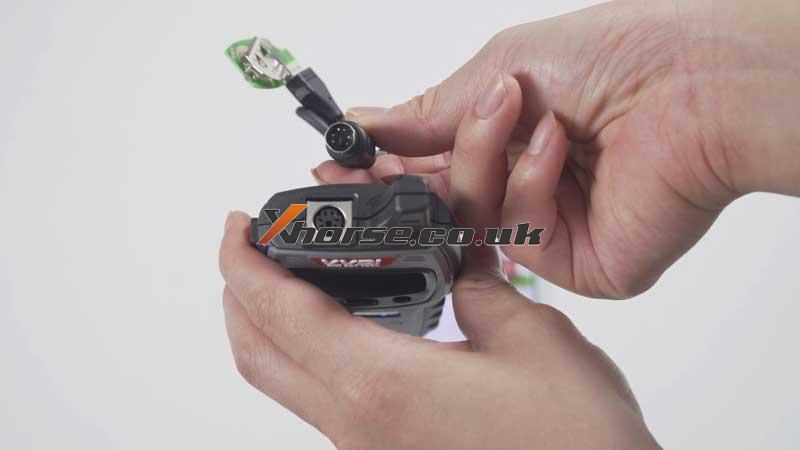
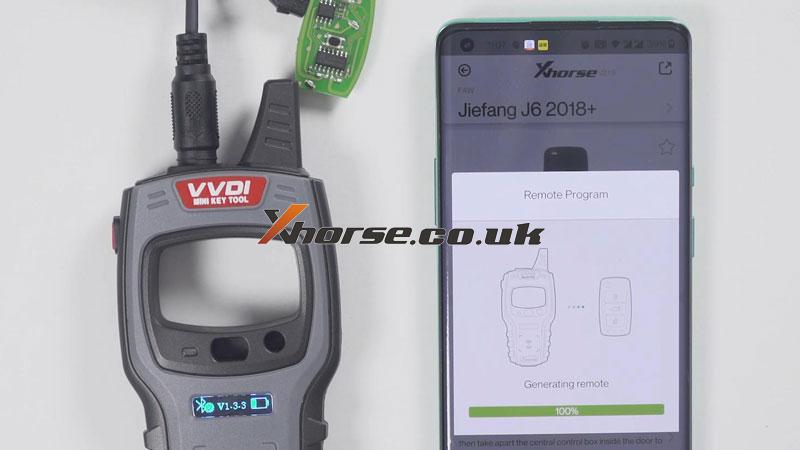
The separate outer shell of smart key, take out mainboard to connect with Mini Key Tool via cable. Press

Vehicle remote >> Select vehicle model, FAW >> Jiefang J6 2018+ >> Generate >> Complete

how-to-use-xhorse-vvdi-mini-key-tool-operation-guide-7

how-to-use-xhorse-vvdi-mini-key-tool-operation-guide-8

how-to-use-xhorse-vvdi-mini-key-tool-operation-guide-9

how-to-use-xhorse-vvdi-mini-key-tool-operation-guide-10

How to change language & view version?

Setting button on the top left corner >> Language

how-to-use-xhorse-vvdi-mini-key-tool-operation-guide-11

how-to-use-xhorse-vvdi-mini-key-tool-operation-guide-12

how-to-use-xhorse-vvdi-mini-key-tool-operation-guide-13

Device information >> View version

how-to-use-xhorse-vvdi-mini-key-tool-operation-guide-14

Any questions about the VVDI Mini Key Tool please contact us.

https://www.xhorse.co.uk/


Friday, 7 May 2021

Top 8 best Xhorse VVDI Tools Comparison

What are the differences among Xhorse VVDI tools? Here we have listed 8 kinds below for reference.


Comparison

VVDI Key Tool Plus

VVDI2

VVDI MB Tool

VVDI BIM Tool Pro for BMW

VVDI Mini Prog

VVDI Key Tool Max

Mini Key Tool

Mini OBD Tool


VVDI Key Tool Plus Pad is mainly designed for locksmiths to program keys while other Xhorse tools have some more professional features like programming and coding for specific cars.

xhorse tools


VVDI Key Tool Plus vs. Key Tool Max vs. Mini Key Tool vs. Mini OBD Tool

IMMO Programming Functions

VVDI Key Tool Plus > VVDI Key Tool Max + Mini Key Tool + Mini OBD Tool


VVDI Key Tool Plus vs. VVDI2

VVDI2 supports diagnosing, change control module, unprotect firmware, manipulate data...while Key Tool Plus only supports key match.


VVDI Key Tool Plus vs. VVDI MB Tool

Key Tool Plus supports almost all functions as VVDI MB except for mileage correction for Mercedes.


VVDI Key Tool Plus vs. VVDI BIM Tool for BMW

VVDI BMW tool is mainly designed for programming & coding modules for BMW, including BMW key match.

Key Tool Plus supports programming keys for various makers rather than simply BMW.


VVDI Key Tool Plus vs. VVDI Mini Prog

Key Tool Plus prog is mainly used to read & write data without welding for the key matches. It supports BMW all series, Porsche, Land Rover...no need to weld, pry feet, cut lines, or dismantle chips.

VVDI Mini Prog is a comprehensive and powerful programming device, which requires a soldering iron experience. It supports reading & write data for different modules and chips during car diagnosis.


Conclusion

Recommendation for a locksmith:

VVDI Key Tool Plus, VVDI MB, VVDI Key Tool Max, Mini OBD Tool, Mini Key Tool


Recommendation for mechanic & car repair shop:

VVDI2, VVDI BIM, VVDI Mini Prog.

https://www.obd2shop.co.uk/


Tuesday, 27 April 2021

How Xhorse VVDI Key Tool Max Read Kia/Hyundai ID46 Pin Code?

Xhorse VVDI Key Tool Max can read Kia/Hyundai ID46 pin code successfully, so does Mini Key Tool. Today I’m gonna try it on a Kia Sorento XM 2013 using a working key ID46 chip.


Firstly, make sure Key Tool Max is connected with WIFI.

Put the working key into Key Tool Max coil, let’s start:


Transponder clone >> Read transponder >> Clone >> Start clone >> Kia/Hyundai password >> Original key clone(recommend) - long distance snifter


It is sniffing data...so place Key Tool Max as close as the programming slot here and insert the working key to turn it on.


Snifter data success.

xhorse-vvdi-key-tool-max-read-kia-id46-pin-code-01

xhorse-vvdi-key-tool-max-read-kia-id46-pin-code-02

xhorse-vvdi-key-tool-max-read-kia-id46-pin-code-03

It is asking to put the working key into Key Tool Max coil again.


Wait for calculating data until 100%...


Calculate success.

Pin code was readout.

xhorse-vvdi-key-tool-max-read-kia-id46-pin-code-04

xhorse-vvdi-key-tool-max-read-kia-id46-pin-code-05

Now you can use the Kia pin code to program keys.


Using VVDI Key Tool Max Key Programmer to calculate a Kia Sorento XM 2013 ID46 pin code is such easy to be done!

https://www.obd2shop.co.uk/


Wednesday, 31 March 2021

What Xhorse tool for renew key?

Planning to start my trip with keys, and wanna know what Xhorse tool should I buy for renew key? I would like to start to renew used key, clean them and add to car - sell for others.


Xhorse tools that is able to renew keys:

Xhorse VVDI Key Tool Max with Renew Cable: yes (best coverage) 

vvdi key tool plus: yes

VVDI Mini Key Tool: Yes

key-tool-max-renew-01


Moreover, The question must be - What Tool$$$$


$ must buy. With one tool you can't start also you will need a cutting machine and a minimum of 1 year of learning.


And more advice:

I think maybe the best thing to do. 

Is to start with old PCB's from computers found on the junkyard. 

And just learn how to remove. Clean and solder back. 

EEPROM, microprocessors. 


It's free. Don't need expensive equipment. 

Low cost is OK. But need adjustable temperature, on the soldering iron.

And then need a lot of practice. 

And a low-cost set of solder tools.

Start with this a couple of months. 


And then move on to junkyard locks. 

dismantle into pieces.

Many different models, from different cars.

Work with this for a while. Its low cost.


After this, its OK to look at the rest.

And maybe get a programmer, or something.


https://www.xhorse.co.uk/


Friday, 4 September 2020

VVDI Mini Key Tool Generate Suzuki 2019 Smart Key

In this article, you can learn how to generate a Suzuki 2019 smart key using VVDI Mini Key Tool, Xhorse universal smart key and Android smart phone. It’s quite simple to operate, anyone can do it. Just follow the steps below.


mini-key-tool-generate-suzuki-2019-smart-key-1

Turn on Bluetooth to connect Mini Key Tool and Android smart phone

mini-key-tool-generate-suzuki-2019-smart-key-2

Select [Vehicle Remote] option

Put the Xhorse smart keyless Go into Mini Key Tool coil position to detect 

Select “SUZUKI”-> “Dzire_test 3btn 2407”

Then tap [Generate] at the bottom right of the screen

mini-key-tool-generate-suzuki-2019-smart-key-3

mini-key-tool-generate-suzuki-2019-smart-key-1

Generating remote…

Burn success

mini-key-tool-generate-suzuki-2019-smart-key-5

Back to main menu

Select [Remote Clone]

Put the Xhorse smart key close to Mini Key Tool 

Detect the frequency successfully

mini-key-tool-generate-suzuki-2019-smart-key-6


Job’s done!

Xhorse VVDI MINI Key Tool Global Version Get Free ID48 96bit and One Token Free Everyday One Year:

https://www.xhorse.co.uk/wholesale/xhorse-vvdi-mini-key-tool.html

Xhorse Universal Smart Proximity Key Keyless Go for VVDI Key Tool/MINI Key Tool/VVDI2 Remote Generator:

https://www.xhorse.co.uk/wholesale/pre-order-xhorse-universal-smart-key-keyless-go.html


Saturday, 27 April 2019

Xhorse VVDI Mini Key Tool User Manual

Here shares you with the VVDI Mini Key Tool User Manual: how to use and how to connect the device to your phone.

Mini key tool overview:

xhorse-vvdi-mini-key-tool-manuale-dell-utente-01
How to use Mini key tool:


Start: press and hold the power button for 1 second
Shut down: press and hold the power button for 4 seconds
xhorse-vvdi-mini-key-tool-manuale-dell-utente-01


Transponder detection: press the power button for 1 second
Frequency test: press and hold the power button for 2 seconds

xhorse-vvdi-mini-key-tool-manuale-dell-utente-03


How to connect the device to your phone:

Step1. Download the APP from Google play or Apple APP store

xhorse-vvdi-mini-key-tool-manuale-dell-utente-04

Step2. Enter the main interface of APP and click "add device" to connect

xhorse-vvdi-mini-key-tool-manuale-dell-utente-05
Step3. The Bluetooth of the cell phone is required to be turned on

xhorse-vvdi-mini-key-tool-manuale-dell-utente-06
Step4. Click "search for new device" and pair the device according to SN
xhorse-vvdi-mini-key-tool-manuale-dell-utente-07


Further detailed information please check here: http://www.obd2shop.co.uk/wholesale/xhorse-vvdi-mini-key-tool.html