Tuesday, 1 November 2022

Xhorse Dolphin XP-005 Cut VW Audi HU162T Key Tutorial

Xhorse Dolphin XP-005 Key Cutting Machine supports cutting the latest HU162T key with 9/10 bittings, such as VW Golf 7 or Audi. This is a tutorial on how to cut this particular type of key.

xhorse-dolphin-xp-005-cut-vw-audi-hu162t-key-tutorial-1

xhorse-dolphin-xp-005-cut-vw-audi-hu162t-key-tutorial-2

1. Go to Cut By Bitting >> HU162T-10/ HU162T-9

Eg. Taking cut 9 bittings as an example.

xhorse-dolphin-xp-005-cut-vw-audi-hu162t-key-tutorial-3

2. Decode the front 9 bittings & select B clamp first, then continue to cut this side.

xhorse-dolphin-xp-005-cut-vw-audi-hu162t-key-tutorial-4

xhorse-dolphin-xp-005-cut-vw-audi-hu162t-key-tutorial-5

3. Return to the previous page, and select 3 bittings & D clamp. This will need another HU162T key blank to fix the key firmly. Go on to decode the key, then cut the key.

xhorse-dolphin-xp-005-cut-vw-audi-hu162t-key-tutorial-6

xhorse-dolphin-xp-005-cut-vw-audi-hu162t-key-tutorial-7

That's it!

The cutting steps apply to Dolphin II as well.

Tuesday, 25 October 2022

(Solved) Xhorse Condor XC Mini Plus motor not spinning

Problem: My Condor XC Mini Plus, everything else works on it, the X Y Z axis also works fine and I have upgraded it to the latest version, but the motor won't spin.

condor-xc-mini-plus-motor-not-spinning-1

condor-xc-mini-plus-motor-not-spinning-2

Solution: Replace the driver board.


For more technical services, follow http://blog.obd2shop.co.uk/

Thursday, 6 October 2022

Xhorse Key Tool Max + Obdstar X300 DP Plus Add 2013 Captiva Key

This is a quick demo on showing how to program a new 2013 Chevrolet Captiva key with Xhorse VVDI Key Tool MAX & OBDSTAR X300 DP PLUS. Preparing a universal wire or wireless remote is doable. Quite an easy job in 2 minutes. Here we go.


Generate Remote via VVDI Key Tool MAX

Open key shell, connect circuit board to Key Tool MAX via cable. 

Vehicle remote >> Chevrolet >> Captiva >> Captiva 08-15 ASK 433 >> Generate remote

Burn success.

vvdi-key-tool-max-obdstar-x300-dp-plus-add-captiva-key-1

vvdi-key-tool-max-obdstar-x300-dp-plus-add-captiva-key-2

vvdi-key-tool-max-obdstar-x300-dp-plus-add-captiva-key-3

vvdi-key-tool-max-obdstar-x300-dp-plus-add-captiva-key-4

Add Key via Key Master DP Plus

Install a battery into remote, let's start:

IMMO >> Americas >> GM >> Latest version >> Remote >> Select from vehicle >> Chevrolet >> AVEO >> 2006-2012 >> Add remote


Within 1 minute, at the same time hold each lock and unlock button of the remote until the vehicle sound.

Press "ENTER".

Program complete.


Test the new key, it does work.

Done.

vvdi-key-tool-max-obdstar-x300-dp-plus-add-captiva-key-5

vvdi-key-tool-max-obdstar-x300-dp-plus-add-captiva-key-6

vvdi-key-tool-max-obdstar-x300-dp-plus-add-captiva-key-7

vvdi-key-tool-max-obdstar-x300-dp-plus-add-captiva-key-8


Xhorse & Obdstar can program 2013 Chevy Captiva key adding successfully.

www.obd2shop.co.uk


Monday, 8 August 2022

Renew BMW F series 868MHz Remote via VVDI Mini Key Tool

This post will show you how to use Xhorse vvdi mini key tool to renew your BMW F series 868MHz remote.


Tools you need:


VVDI Mini Key Tool

BMW F series 868MHz remote

Xhorse Remote Renew Cable

Smartphone


Step 1. Insert the remote into the mini key tool slot, select "Transponder Clone " and click "Read transponder" in the lower right corner.


bmw-f-series-remote-renew-via-mini-key-tool-01

bmw-f-series-remote-renew-via-mini-key-tool-02

You can see that the current status of the remote is "Already locked".


bmw-f-series-remote-renew-via-mini-key-tool-03

Step 2. Disassemble the BMW remote and connect it to the mini key tool via the Xhorse remote renew cable.


bmw-f-series-remote-renew-via-mini-key-tool-04

Select "Special function" → "Remote Renew" → "BMW" → "SWK49661 F Series 868MHz Continental"


bmw-f-series-remote-renew-via-mini-key-tool-05

Click "Unlock"

Renew in the process...

Renew Success.


bmw-f-series-remote-renew-via-mini-key-tool-06

Step 3. Go back to the original interface and repeat step 1.


At this point, you can see that the current status of the remote is "Unlocked".


bmw-f-series-remote-renew-via-mini-key-tool-07

Video guides:

Sunday, 17 April 2022

How to Combine & Activate Account on Xhorse Key Reader?

Xhorse Key Reader XDKR00GL is able to identify aluminum keys, plastic keys and metal keys in seconds. Supports to be controlled on a smart phone or working with VVDI Key Tool MAX or VVDI Key Tool Plus Pad. This is a guide to use Key Reader including 2 parts: combine & activate account, identify key bitting.


How to combine & activate Xhorse account?

This is taking a Hyundai KIA7 key as demonstration.

Path in Key Reader: 

Optional identification >> Hyundai >> All key blank >> KIA7 >> OK >> Connect

combine-activate-account-on-xhorse-key-reader-1

combine-activate-account-on-xhorse-key-reader-2


Turn on "Automatic connect" button to connect device.

Start to set >> Send

Wait for the security codes, then enter.

Note:

1. After combine device to account, this device's bonus points will share to account.

2. Parts of function support to share to different devices in this account.


Press "Combine device".

Combined success.

Xhorse Key Reader will process to activate automatically.

Device activation success.

combine-activate-account-on-xhorse-key-reader-3

combine-activate-account-on-xhorse-key-reader-4

How to identify key?

Now you can start to identify keys.

Press "Start to use" to go on.


Operation Steps:

1. Insert key into Key Reader key slot.

2. Continuous press twice: Identification >> identification

Key Reader will finish reading in seconds.

* If the bitting doesn't match, adjust with the keypad below.

combine-activate-account-on-xhorse-key-reader-5

combine-activate-account-on-xhorse-key-reader-6

As long as connecting with Xhorse Key Cutting Machine, you can continue to cut key here by pressing "To cut" directly.

http://blog.obd2shop.co.uk/how-to-combine-activate-account-on-xhorse-key-reader/


Monday, 10 January 2022

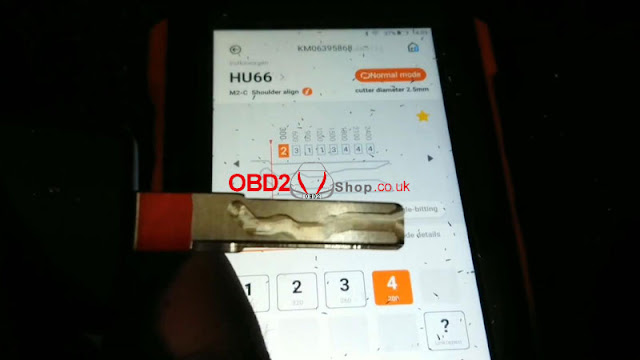
LISHI + Xhorse Dolphin XP005 Decode & Cut VW HU66 AKL

Use LISHI 2-in-1 Auto Pick working with Xhorse Dolphin XP005 can easily decode & cut a VW HU66 key when all keys lost. As long as you have a car lock, the LISHI decoder can extract it for cutting a new key.


Following this, I’m gonna demonstrate how to do it.


Decode Key

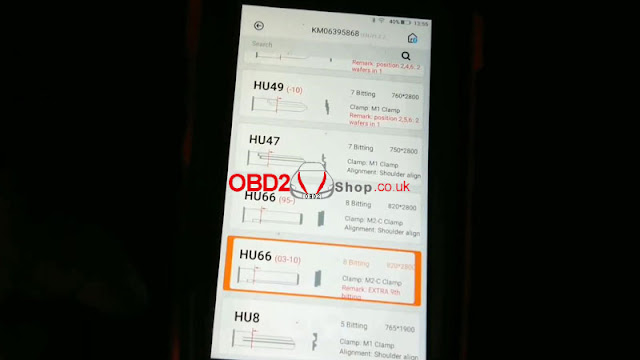
Firstly it needs to connect with the Dolphin XP005 machine via the Xhorse app or VVDI Key Tool MAX programmer. Enter into

Vehicle database >> Volkswagen >> All key blank >> HU66

lishi-xhorse-dolphin-xp005-decode-cut-vw-hu66-akl-1

lishi-xhorse-dolphin-xp005-decode-cut-vw-hu66-akl-2

lishi-xhorse-dolphin-xp005-decode-cut-vw-hu66-akl-3


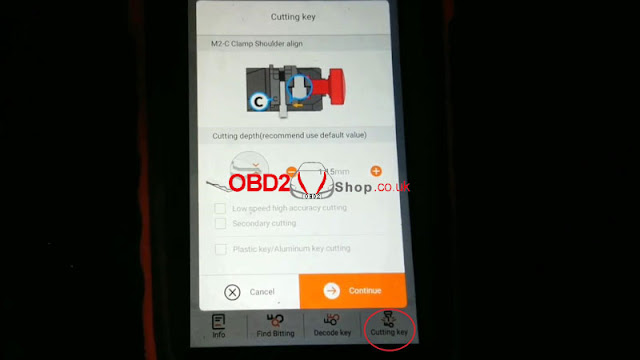
M2-C clamp shoulder align.

Install key blank as prompted.


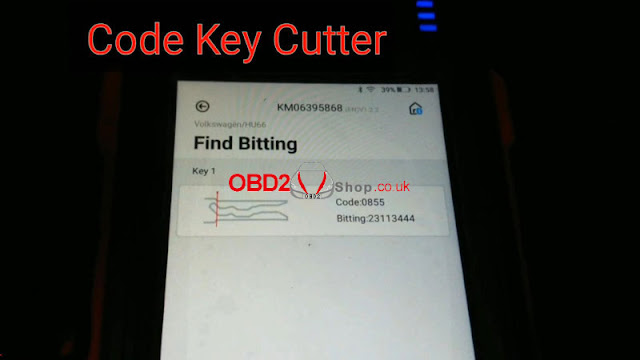
Input the codes decoded by LISHI: 23113444

Press “Find Bitting”.

A key type was displayed with code 0855, that’s it!

lishi-xhorse-dolphin-xp005-decode-cut-vw-hu66-akl-4

lishi-xhorse-dolphin-xp005-decode-cut-vw-hu66-akl-5

lishi-xhorse-dolphin-xp005-decode-cut-vw-hu66-akl-6

Cut Key

Cutting key >> Continue

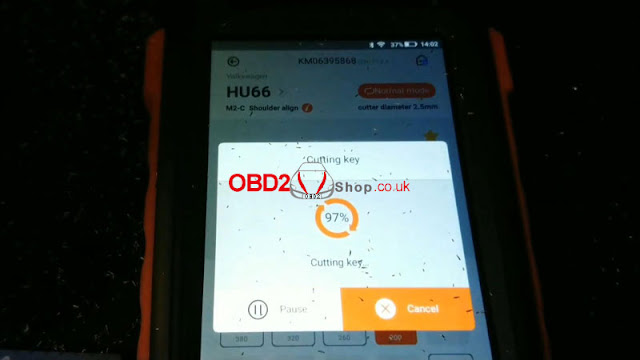
Dolphin XP005 will work automatically on command.

Just wait until 100%...

Cutting key completed.


Clean & turn over key to cut the other side.

Repeat same command as before.

Either Key Tool MAX or Xhorse Dolphin screen can show the cutting progress.

100% again, completed!

lishi-xhorse-dolphin-xp005-decode-cut-vw-hu66-akl-7

lishi-xhorse-dolphin-xp005-decode-cut-vw-hu66-akl-8

lishi-xhorse-dolphin-xp005-decode-cut-vw-hu66-akl-9

lishi-xhorse-dolphin-xp005-decode-cut-vw-hu66-akl-10

Let’s take it out to have a try.

It can open the lock.

Done!

lishi-xhorse-dolphin-xp005-decode-cut-vw-hu66-akl-11

lishi-xhorse-dolphin-xp005-decode-cut-vw-hu66-akl-12

It’s said new tool Xhorse Key Reader also supports decoding keys with ease. But it does not work for all keys lost, a key is a must-have. Believe having those tools can help locksmiths much.

http://blog.obd2shop.co.uk/lishi-xhorse-dolphin-xp005-decode-cut-vw-hu66-akl/

Tuesday, 7 December 2021

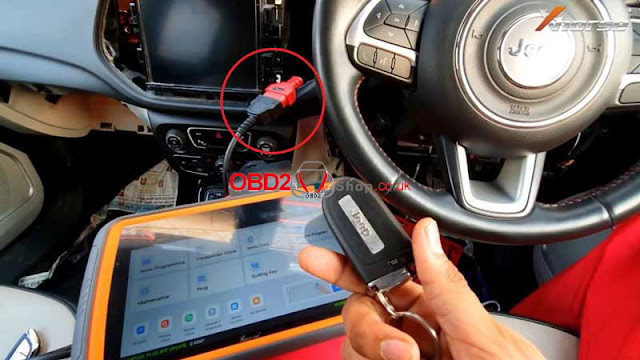
Xhorse VVDI Key Tool Plus Add Jeep Compass 2017+ Key Success

Xhorse VVDI Key Tool Plus Pad supports to add smart key for Jeep Compass 2017+ successfully. Need to connect with Xhorse FCA 12+8 Cable for programming. The 12+8 cable also allows programming Dodge 2018+, Chrysler 2018+. 

xhorse-vvdi-key-tool-plus-add-jeep-compass-2017-2021-key-success-01

For operation details, refer to the following:


Plug FCA 12+8 Cable to SGW, and connect with VVDI Key Tool Plus.


Immo programming >> Jeep >> Select from model >> Asia >> Compass >> 2017- >> Keyless go >> Start programming >> OK


We can check the number of key, it is currently 1 key.

xhorse-vvdi-key-tool-plus-add-jeep-compass-2017-2021-key-success-02


Program smart key >> OK


Switch ignition off, turn on the security warning light.


Make sure there are no wireless devices near the smart key.

Keep the smart key to be programmed close to the central console(or start button), then press and release UNLOCK button on the remote once and wait for 5s. Do not press any button during this time.


Note: the new key must be the original key of the current model, otherwise the program may fail.

Match successfully, current key number: 2.


Test all keys, all work well.


Done!

xhorse-vvdi-key-tool-plus-add-jeep-compass-2017-2021-key-success-03

xhorse-vvdi-key-tool-plus-add-jeep-compass-2017-2021-key-success-04

xhorse-vvdi-key-tool-plus-add-jeep-compass-2017-2021-key-success-05

This is how to use VVDI Key Tool Plus to do Jeep Compass 2017- key programming.


Article Source: http://blog.obd2shop.co.uk/xhorse-vvdi-key-tool-plus-add-jeep-compass-2017-key-success/