Wednesday, 19 May 2021

Xhorse VVDI Mini OBD Tool Read 2013 Peugeot Partner Pin Code

Xhorse VVDI Mini OBD Tool can read pin code for 2013 Peugeot Partner successfully. Pin code(password) reading is one of the functions that Mini OBD Tool has, which can be used for following key programming.

xhorse-vvdi-mini-obd-tool-read-2013-peugeot-partner-pin-code-1

How to use VVDI Mini OBD Tool to read pin code?

Here we take a 2013 Peugeot Partner to demonstrate the procedure.

Plug Mini OBD Tool into OBD2 port.

Connect it with the Xhorse app via Bluetooth.

Turn ignition on.

xhorse-vvdi-mini-obd-tool-read-2013-peugeot-partner-pin-code-2

Immo programming >> Peugeot >> Password reading >> Type 1 CAN (all keys lost or adding) >> Start execution


Wait for loading until 100%...


IMMO password reading >> OK

xhorse-vvdi-mini-obd-tool-read-2013-peugeot-partner-pin-code-3

xhorse-vvdi-mini-obd-tool-read-2013-peugeot-partner-pin-code-4

xhorse-vvdi-mini-obd-tool-read-2013-peugeot-partner-pin-code-5

xhorse-vvdi-mini-obd-tool-read-2013-peugeot-partner-pin-code-6

xhorse-vvdi-mini-obd-tool-read-2013-peugeot-partner-pin-code-7

Please turn on the double flash indicator, press “OK”.


Please open then close the driver door once, press “OK”.


Wait for communicating...


Pin code was readout.

Done!

xhorse-vvdi-mini-obd-tool-read-2013-peugeot-partner-pin-code-8

xhorse-vvdi-mini-obd-tool-read-2013-peugeot-partner-pin-code-9

xhorse-vvdi-mini-obd-tool-read-2013-peugeot-partner-pin-code-10

It is such easy and fast, only to have a VVDI Mini OBD Tool & a phone, we can finally get the pin code.

https://www.xhorse.co.uk/

Thursday, 13 May 2021

Buy Xhorse vvdi mini Key Tool or lonsdor kh100

Battle: Xhorse vvdi mini key tool or lonsdor kh100, what are their Pros & cons? Aims to clone customers keys/fobs (adding the second key) also maybe if all keys lost then generating new keys.


And most locksmiths prefers to Xhorse vvdi mini Key Tool:


Review 1: 

I have Mini VVDI Key Tool and the "Superchips". These Superchips are wonderful, you can configure them as a lot of chips, you can erase them and reuse them many many times. They are perfect for tests, for expensive or hard to find chips, or if you need to do the job exactly at the moment when you don't have the exact type of chip in stock. But you can use regular chips too with VVDI Mini Key Tool.


Review 2:

I have both KH100 has nice features but the vvdi mini tool wins hand down.. you need to buy tokens for cloning ID48.


Review 3:

Vvdi mini is better. You have a unique solution with super chip xt27 from xhorse.


Can use it for all type of transponder


I use on Toyota h, id48 96bits, Id46, 4c, 4d...


It's best.


Cloning h, id48...


Renew remote, prépare remote, clone remote, test coil, test freq from remote...


And all for 130usd!!!


To be updating...


www.xhorse.co.uk


Wednesday, 12 May 2021

How to Use Xhorse VVDI Mini Key Tool?(Operation Guide)

Xhorse VVDI Mini Key Tool comes with a small size & high-speed device, which supports generating/edit/clone transponder, generate/clone remote, test frequency, activate Toyota H transponder generation...etc.


This article is an initial operation guide of main functions for beginners.

- Chip Generation

- Wireless Remote Generation

- Wired Remote Generation

- Language Change and Version View


Xhorse VVDI Mini Key Tool Tutorial:

https://www.youtube.com/watch?v=n9wX7SdCGTw


How to generate a transponder chip?

Put a VVDI Super Chip into the Mini Key Tool slot, press

Generate transponder >> Select a model, ID46 (PCF7937) >> Generate >> Complete

how-to-use-xhorse-vvdi-mini-key-tool-operation-guide-1

how-to-use-xhorse-vvdi-mini-key-tool-operation-guide-2

how-to-use-xhorse-vvdi-mini-key-tool-operation-guide-3

How to use wireless remote generation?

Put a smart key into the Mini Key Tool slot, press

Vehicle remote >> Select vehicle model, Acura >> ILX/CDX/TLX KeylessGo ID47 433M >> Generate >> Complete

how-to-use-xhorse-vvdi-mini-key-tool-operation-guide-4

how-to-use-xhorse-vvdi-mini-key-tool-operation-guide-5

how-to-use-xhorse-vvdi-mini-key-tool-operation-guide-6


How to use wired remote generation?

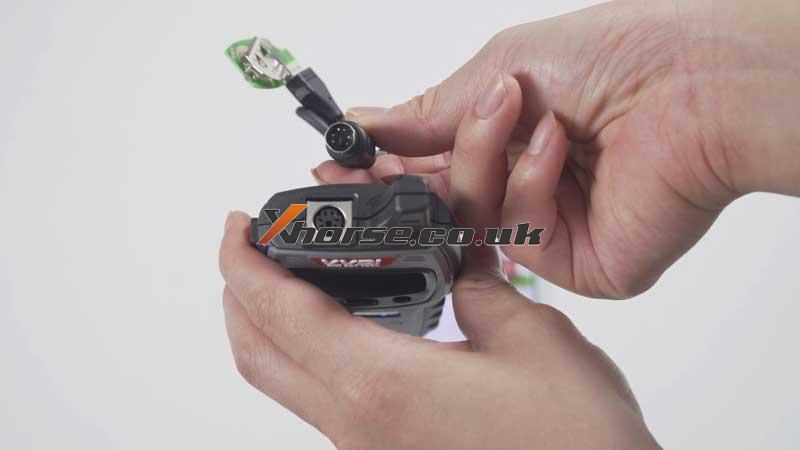
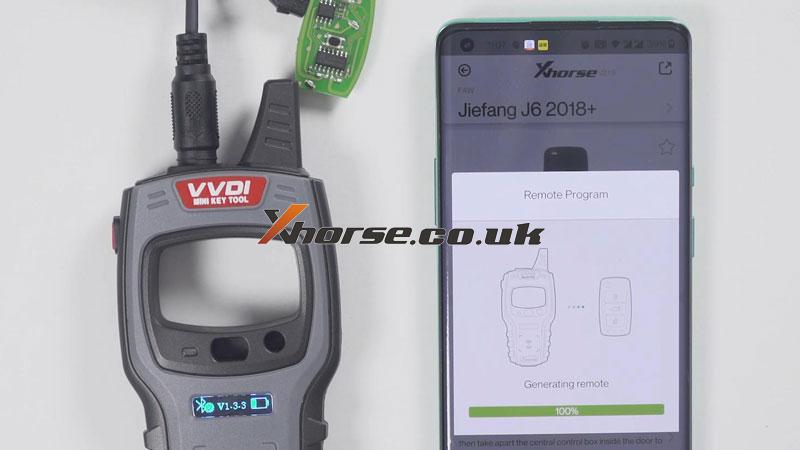
The separate outer shell of smart key, take out mainboard to connect with Mini Key Tool via cable. Press

Vehicle remote >> Select vehicle model, FAW >> Jiefang J6 2018+ >> Generate >> Complete

how-to-use-xhorse-vvdi-mini-key-tool-operation-guide-7

how-to-use-xhorse-vvdi-mini-key-tool-operation-guide-8

how-to-use-xhorse-vvdi-mini-key-tool-operation-guide-9

how-to-use-xhorse-vvdi-mini-key-tool-operation-guide-10

How to change language & view version?

Setting button on the top left corner >> Language

how-to-use-xhorse-vvdi-mini-key-tool-operation-guide-11

how-to-use-xhorse-vvdi-mini-key-tool-operation-guide-12

how-to-use-xhorse-vvdi-mini-key-tool-operation-guide-13

Device information >> View version

how-to-use-xhorse-vvdi-mini-key-tool-operation-guide-14

Any questions about the VVDI Mini Key Tool please contact us.

https://www.xhorse.co.uk/


Friday, 7 May 2021

Top 8 best Xhorse VVDI Tools Comparison

What are the differences among Xhorse VVDI tools? Here we have listed 8 kinds below for reference.


Comparison

VVDI Key Tool Plus

VVDI2

VVDI MB Tool

VVDI BIM Tool Pro for BMW

VVDI Mini Prog

VVDI Key Tool Max

Mini Key Tool

Mini OBD Tool


VVDI Key Tool Plus Pad is mainly designed for locksmiths to program keys while other Xhorse tools have some more professional features like programming and coding for specific cars.

xhorse tools


VVDI Key Tool Plus vs. Key Tool Max vs. Mini Key Tool vs. Mini OBD Tool

IMMO Programming Functions

VVDI Key Tool Plus > VVDI Key Tool Max + Mini Key Tool + Mini OBD Tool


VVDI Key Tool Plus vs. VVDI2

VVDI2 supports diagnosing, change control module, unprotect firmware, manipulate data...while Key Tool Plus only supports key match.


VVDI Key Tool Plus vs. VVDI MB Tool

Key Tool Plus supports almost all functions as VVDI MB except for mileage correction for Mercedes.


VVDI Key Tool Plus vs. VVDI BIM Tool for BMW

VVDI BMW tool is mainly designed for programming & coding modules for BMW, including BMW key match.

Key Tool Plus supports programming keys for various makers rather than simply BMW.


VVDI Key Tool Plus vs. VVDI Mini Prog

Key Tool Plus prog is mainly used to read & write data without welding for the key matches. It supports BMW all series, Porsche, Land Rover...no need to weld, pry feet, cut lines, or dismantle chips.

VVDI Mini Prog is a comprehensive and powerful programming device, which requires a soldering iron experience. It supports reading & write data for different modules and chips during car diagnosis.


Conclusion

Recommendation for a locksmith:

VVDI Key Tool Plus, VVDI MB, VVDI Key Tool Max, Mini OBD Tool, Mini Key Tool


Recommendation for mechanic & car repair shop:

VVDI2, VVDI BIM, VVDI Mini Prog.

https://www.obd2shop.co.uk/


Wednesday, 28 April 2021

How to Cut VW Passat Key via Xhorse Condor XC-Mini Plus?

This is a 2001-2005 Volkswagen Passat door lock, today I’ll use the Xhorse Condor XC-Mini Plus key cutting machine to cut a key for it. 


Have been dismantled and decoded Passat lock, here we go to cut the key directly.


Press on XC-Mini Plus tablet screen, 

Key duplication >> Volkswagen >> Passat >> B5.5 - Typ 3B / 3BG(2001-2005) >> Confirm

cut-vw-passat-key-via-xhorse-condor-xc-mini-plus-(1)

cut-vw-passat-key-via-xhorse-condor-xc-mini-plus-(2)

Input the 8 bitting codes: 33112334

Fix the key blank flat on the clamp.

This time I’m using an emergency plastic key blank, so press “Cut Key Plastic”. Otherwise, press “Cut” for common metal key blank.

Condor XC-Mini machine starts cutting...

As you can see, it is cutting very neat.

Wait until cutting completed.

Clean the iron scraps, and take out the key to have a try.

Alright, it fits the lock and can open it.

cut-vw-passat-key-via-xhorse-condor-xc-mini-plus-(3)

cut-vw-passat-key-via-xhorse-condor-xc-mini-plus-(4)

Using Condor XC-Mini Plus Automatic Machine to cut a key for VW Passat 2001-2005 is successful!

https://www.obd2shop.co.uk/


Xhorse Mini Prog and VVDI Max Program VW CC 2013 Key on Bench

Today, I successfully used Xhorse Mini Prog and VVDI Key Tool Max to program VW CC 2013 Key on Bench. 

xhorse-mini-prog-vvdi-max-program-2013-vw-cc-key-01

Look at EEPROM M95320 (pressure) that is removed from the car. 

xhorse-mini-prog-vvdi-max-program-2013-vw-cc-key-02

xhorse-mini-prog-vvdi-max-program-2013-vw-cc-key-03

Prepare:

1. Use the tool to clear the chip pin. 

2. Connect the device and the adapter.

Put the adapter on the chip (press the light button to turn on the floodlight).

xhorse-mini-prog-vvdi-max-program-2013-vw-cc-key-04

Part 1. Read M95320 (pressure) EEPROM

Meanwhile, on Xhorse APP, switch to Mini Prog, and then click on "EEPROM and Flash" -> ST -> M95XXX -> M95320 (pressure) -> Read -> EEPROM -> Start Operation -> Continue -> Reading completely and save the file. 

And you can see "OK" at the back of Mini Prog. 

xhorse-mini-prog-vvdi-max-program-2013-vw-cc-key-05

xhorse-mini-prog-vvdi-max-program-2013-vw-cc-key-06

xhorse-mini-prog-vvdi-max-program-2013-vw-cc-key-07

xhorse-mini-prog-vvdi-max-program-2013-vw-cc-key-08

xhorse-mini-prog-vvdi-max-program-2013-vw-cc-key-09

xhorse-mini-prog-vvdi-max-program-2013-vw-cc-key-10

xhorse-mini-prog-vvdi-max-program-2013-vw-cc-key-11

xhorse-mini-prog-vvdi-max-program-2013-vw-cc-key-12

Part 2. Prepare dealer key

Back to Xhorse APP and switch to Keytool Max, tap "Special Function" -> Immo Data Tool -> Asia -> VW -> Passat -> Comfort ID48 - 95320 -> Start Execution ->Local file -> Mini_Prog -> M95320 (pressure) .bin -> Trying to decrypt dump buffer... -> Tick off "Key4 (Unuse)" -> Place the new VVDI Super chip into the keyhole of VVDI Max -> Prepare dealer key -> Tick off "Megamos 48" and tap "Ok" -> Ok -> Prepare dealer key success. It can start engine after writing back new dump file -> Save the new dump file. 

xhorse-mini-prog-vvdi-max-program-2013-vw-cc-key-13

xhorse-mini-prog-vvdi-max-program-2013-vw-cc-key-14

xhorse-mini-prog-vvdi-max-program-2013-vw-cc-key-15

xhorse-mini-prog-vvdi-max-program-2013-vw-cc-key-16

xhorse-mini-prog-vvdi-max-program-2013-vw-cc-key-17

xhorse-mini-prog-vvdi-max-program-2013-vw-cc-key-18

xhorse-mini-prog-vvdi-max-program-2013-vw-cc-key-19

xhorse-mini-prog-vvdi-max-program-2013-vw-cc-key-20

xhorse-mini-prog-vvdi-max-program-2013-vw-cc-key-21

Part 3. Write M95320 (pressure) EEPROM Completely 

Take VVDI Super chip out of the VVDI Max.

Back to the main menu of Xhorse APP, switch to Mini Prog menu, click on "EEPROM and Flash" -> ST -> M95XXX -> M95320 (pressure) -> Write -> EEPROM -> Start Operation -> Tap "Select" to select the write file -> Local file -> Mini_Prog -> M95320 (pressure) .bin -> Back to "Write - EEPROM - M95320 (pressure)" and meanwhile Put the adapter on the chip (press the light button to turn on the floodlight) -> Start Operation -> Continue -> Write completely and you can see "OK" at the back of Mini Prog. 

xhorse-mini-prog-vvdi-max-program-2013-vw-cc-key-22

xhorse-mini-prog-vvdi-max-program-2013-vw-cc-key-23

xhorse-mini-prog-vvdi-max-program-2013-vw-cc-key-24

xhorse-mini-prog-vvdi-max-program-2013-vw-cc-key-25

Thumb up Xhorse Mini Prog, VVDI Max, VVDI Super Chip. The whole process is smooth and pleasant.