Tuesday, 12 October 2021

Xhorse Dolphin XP-005L Vs Dolphin XP-005


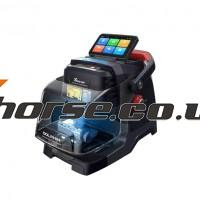
Xhorse Dolphin XP-005L, the upgrade version of Dolphin XP-005, It is the 2nd generation product of Dolphin, also called Xhorse Dolphin II, comes with a touch screen and connects via one phone via Bluetooth and Wifi. Both are compact design, lightweight, much easier to take it outside and provide users outdoor and roadside services.


Xhorse Dolphin II XP-005L Vs Dolphin XP-005:

ItemXhorse Dolphin II XP005LXhorse Dolphin XP-005
ImageXhorse Dolphin XP-005LDolphin XP-005
ScreenAn angle-adjustable 5-inch capacitive touch screen, and users can directly complete operation on the screen.LCD resolution 1280*720.Null
BluetoothYes. Control the machine by the Xhorse app on your smart phone or other intelligent terminals via bluetoothYes,use smart cellphone or tablett to download APP via Bluetooth.
WifiYes, directly upgrade online via wifi connectionNull
Protecting maskYes, prevent metal debris from spattering.Null
Smart status indicatorYes (in blue, yellow, red color)Null
Multiple ClampsStandard equipped M5 clamp (M1 and M2 2 in 1), optional M1/M2 Clamp, M3 Clamp, M4 Clamp.Support clamps M1, M2, M3(optional) and M4 (optional)
Hexagon bar wrench2mm+4mm 3mm hexagon bar wrench, 3mm hexagon bar wrench,6mm hexagon bar wrench2mm hexagon bar wrench,  4mm hexagon bar wrench
WeightNet weight 13KG, Gross weight 18.5KGNet weight 15KG, Gross weight 18KG
LanguageEnglish, Spanish, French, Polish, Italian, Portuguese, etcEnglish, Spanish, French, Polish, Italian, Portuguese, etc
Update onlineMachine firmware and database upgrade via Wifi directlyOnline software update on APP, update through Xhorse"Upgrade Kit".
Key databaseYes, same as XP005Yes
FunctionSelf-calibration, key duplication and cutting for vehicle keys, universal key decode for multiple key types.Self-calibration, key duplication and cutting for vehicle keys, universal key decode for multiple key types.


For more details and how to use them, refer to:

Xhorse Dolphin XP-005L User Manual

Xhorse Dolphin XP-005 User Manual


Questions and answers:

1st question: Can Dolphin II adopt the M1 M2 M3 M4 clamp from other Xhorse cutting machines

Answer: Yes, you can, they are universal.


2nd question: Can Dolphin XP-005L be directly connected to the mobile app?

Answer: Yes, it can.


3rd question: Apart from the hardware difference between XP-005L and Dolphin, is there any difference in other functions?

Answer: they share the same key database, the other functions are the same.


4th question. what language is Dolphin XP-005L available?

Answer: The usable system language is the same as Dolphin XP-005, and the global version language allows to be switched. However, the database language does not completely cover the available system languages, then the user can operate in English for the parts that are not covered.


5th language: Can both Dolphin XP-005L and Dolphin XP-005 cut key when all keys are lost?

Answer: yes, they can.

4th question.When can I purchase one?

Answer: Dolphin II starts pre-sale from today, About 1 Month ship from UK/EU warehouse, Early Order Early Ship.Link:https://www.xhorse.co.uk/wholesale/xhorse-dolphin-xp005l-dolphin-ii-key-cutting-machine.html

Xhorse Dolphin XP-005L  price

 Important: The system needs to intialize for first use.The steps as follows:

1. How To Use Your Smart Pphone APP To Connect Xhorse Dolphin XP005L Dolphin II?
2. Dolphin XP005L Dolphin II Cutting Calibration
3. How to use the vehicle database
4. How to use cut by code for Dolphin XP005L
5. Universal Duplication

Sunday, 10 October 2021

Xhorse Ford All Key Lost Cable work with VVDI Key Tool Plus


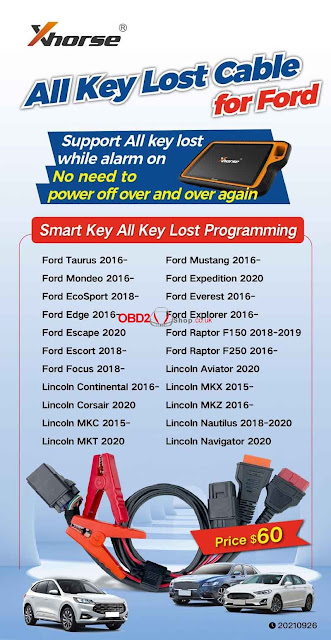
Xhorse All Key Lost Cable For Ford is available!!! Working for VVDI Key Tool Plus. Supports Ford all key lost while alarm on. No need to power off over and over again.

Smart key all key lost programming support:

Ford Taurus 2016-,

Ford Mondeo 2016-,

Ford EcoSport 2018-,

Ford Edge 2016-,

Ford Escape 2020,

Ford Escort 2018-,

Ford Focus 2018-,

Ford Mustang 2016-,

Ford Expedition 2020,

Ford Everest 2016-,

Ford Explorer 2016-,

Ford Raptor F150 2018-2019,

Ford Raptor F250 2016-,

Lincoln Aviator 2020,

Lincoln Continental 2016-,

Lincoln Corsair 2020,

Lincoln MKC 2015-,

Lincoln MKT 2020,

Lincoln MKX 2015-,

Lincoln MKZ 2016-,

Lincoln Nautilus 2018-2020,

Lincoln Navigator 2020.

Xhorse Ford All Key Lost Cable


To program Ford latest vehicles, Xhorse AKL Cable should be a useful accessory.

What are still hesitant to? Come on to get it now for £44: https://www.obd2shop.co.uk/wholesale/xhorse-all-keys-lost-cable-for-ford.html


Wednesday, 15 September 2021

Programming Lexus 570 2012 Key by VVD MAX + Obdstar X300 Pro4

How to unlock & add smart key for a Lexus 570 2012? This is using Xhorse VVDI Key Tool Max and Obdstar X300 Pro4 to do it.


  • VVDI Key Tool Max Unlock Lexus 570 Key

Put the new Lexus key into the VVDI Key Tool Max coil slot, press

Special function >> Unlock Toyota smart key >> Unlock

Unlock OK.

VVDI Key Tool Max Unlock Lexus 570 Key


  • Obdstar X300 Pro4 Program Lexus Key 570 Key

Connect X300 Pro4 with car OBD, press

Diag program >> Toyota Lexus >> Toyota/ Lexus V32.20 >> Select from type >> Proximity >> Type 1 >> Program smart key


Note: each procedure has to complete within the specified time.


Put a working key close to ignition switch, and turn it ON till the dashboard is lit on.

You’ll hear buzzer beeps once.

Obdstar X300 Pro4 Program Lexus Key 570 Ke 01

 Obdstar X300 Pro4 Program Lexus Key 570 Ke 02

 Obdstar X300 Pro4 Program Lexus Key 570 Ke 03

Use a new smart key to contact START button.

Program success.


Test the keys, both can work well.

Key programming has done!

Obdstar X300 Pro4 Program Lexus Key 570 Ke 05

 Obdstar X300 Pro4 Program Lexus Key 570 Ke 06

Use VVDI Key Tool Max working with Obdstar Key Master 5 to unlock & program a new key for 2012 Lexus 570 successfully.

http://blog.obd2shop.co.uk/xhorse-key-tool-max-obdstar-x300-pro4-unlock-add-lexus-570-2012-key/


Thursday, 9 September 2021

(Solved!)Xhorse VVDI2 Volvo 93ะก66 pcf7935 key 4 5 6 not available Problem

Problem: Xhorse VVDI2 Volvo V70 1998- with 93ะก66 and pcf7935. When loading eeprom data, free positions 4, 5 and 6 are not available for writing. How to solve this issue?

VVDI2 Volvo 93ะก66 pcf7935 key 4 5 6 not available


Xhorse senior engineer replied:

Just generate key from 1,2,or 3 position. No need write back data to immobox if using together with Super Chip XT27A01 XT27A66 Transponder; if using together with the original key, need to write back data to immobox.


Alright, Xhorse VVDI2 tech support: http://blog.xhorse.co.uk/


Tuesday, 24 August 2021

How to Check Xhorse Key Tool Plus Mercedes Benz / VW Tokens?

How to view the tokens for Mercedes Benz and VW MQB with Xhorse VVDI Key Tool Plus in step by step.


Part 1. How to View MQB Online Tokens with VVDI Key Tool Plus

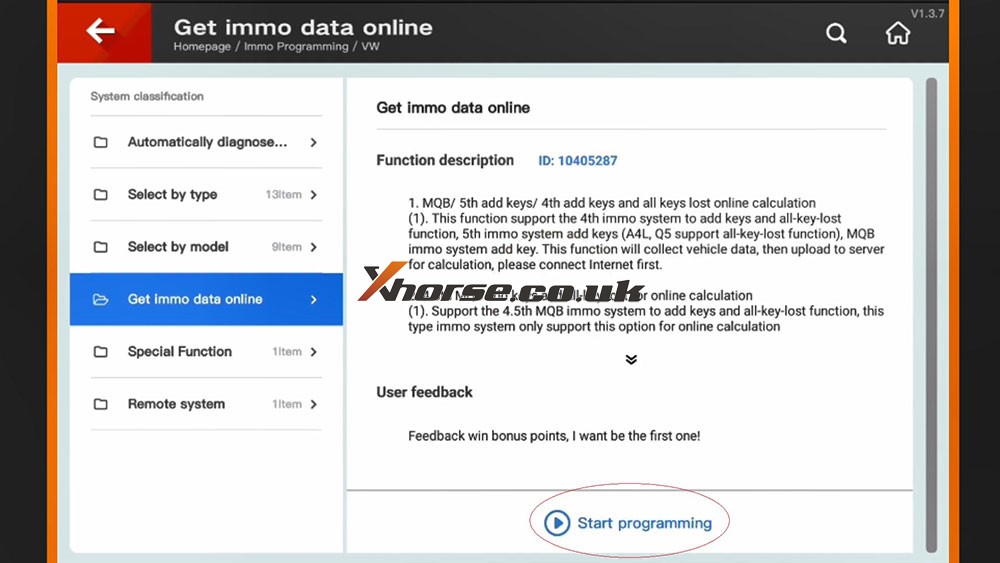
Immo programming -> VW -> Get immo data online -> Start programming -> Balance inquiry

How to check MQB Online Tokens with VVDI Key Tool Plus 01

 How to check MQB Online Tokens with VVDI Key Tool Plus 02

 How to check MQB Online Tokens with VVDI Key Tool Plus 03

 How to check MQB Online Tokens with VVDI Key Tool Plus 04

How to check MQB Online Tokens with VVDI Key Tool Plus 05

Part 2. How to View M Mercedes Benz Tokens with VVDI Key Tool Plus

Immo programming -> Benz -> Select from system -> Password calculation -> Start programming -> Query the Benz points -> here you will see how many times for free calculation, how many times for paid calculation, how many bonus.


How to check MQB Online Tokens with VVDI Key Tool Plus 06

How to check MQB Online Tokens with VVDI Key Tool Plus 07

How to check MQB Online Tokens with VVDI Key Tool Plus 08

How to check MQB Online Tokens with VVDI Key Tool Plus 09


PS: You can get Key Tool Plus for Mercedes Benz Password Calculation Token at here:
https://www.xhorse.co.uk/wholesale/1-token-for-vvdi-key-tool-plus-password-calculation-for-sn-vk08.html

Wednesday, 4 August 2021

Generate Super Chip ID47 using Xhorse VVDI Key Tool Max Tutorial

Xhorse VVDI Key Tool Max is able to generate Super Chip ID47 successfully.

Generate Super Chip ID47 using Xhorse VVDI Key Tool Max 01


Put the super chip ID47 into the coil of VVDI Key Tool Max.


Tap "Generate Transponder" and then "ID47"

Generate Super Chip ID47 using Xhorse VVDI Key Tool Max 02


Tap "New 7938 chip" and then "Generate".

Generate Super Chip ID47 using Xhorse VVDI Key Tool Max 03

Generate Super Chip ID47 using Xhorse VVDI Key Tool Max 04

Detecting transponder

Generate Transponder Complete.

Generate Super Chip ID47 using Xhorse VVDI Key Tool Max 05


Then tap "ID47 Blank" and "Generate".

Generate Super Chip ID47 using Xhorse VVDI Key Tool Max 06


Detecting transponder

Generate Transponder Complete.


Back to the home menu and select "Read Transponder".

Generate Super Chip ID47 using Xhorse VVDI Key Tool Max 07


Alright, ID47 is unlocked and cloneable.

Generate Super Chip ID47 using Xhorse VVDI Key Tool Max 08


Xhorse VVDI Key Tool Max did a good job.


http://blog.xhorse.co.uk/


Thursday, 29 July 2021

How to fix Xhorse VVDI Key tool "DEF" not back to normal

To fix the problem Xhorse vvdi Key tool “DEF” not back to normal likes below:

Xhorse VVDI Key tool "DEF" not back to normal 01

Xhorse VVDI Key tool "DEF" not back to normal  02

Xhorse VVDI Key tool "DEF" not back to normal  03

 
,You may try: 


Method 1. And just put it in English that returns to normal.
Method 2.Reinstall by computer, and select English language
Method 3.Reupdate and make sure there is no break in communication during update.


Good to know:

VVDI Key tool is off-production and replaced by VVDI Mini Key Tool, but they are still releasing updates.


http://blog.xhorse.co.uk/xhorse-vvdi-key-tool-def-not-back-to-normal-solution/