Monday, 8 August 2022

Renew BMW F series 868MHz Remote via VVDI Mini Key Tool

This post will show you how to use Xhorse vvdi mini key tool to renew your BMW F series 868MHz remote.


Tools you need:


VVDI Mini Key Tool

BMW F series 868MHz remote

Xhorse Remote Renew Cable

Smartphone


Step 1. Insert the remote into the mini key tool slot, select "Transponder Clone " and click "Read transponder" in the lower right corner.


bmw-f-series-remote-renew-via-mini-key-tool-01

bmw-f-series-remote-renew-via-mini-key-tool-02

You can see that the current status of the remote is "Already locked".


bmw-f-series-remote-renew-via-mini-key-tool-03

Step 2. Disassemble the BMW remote and connect it to the mini key tool via the Xhorse remote renew cable.


bmw-f-series-remote-renew-via-mini-key-tool-04

Select "Special function" → "Remote Renew" → "BMW" → "SWK49661 F Series 868MHz Continental"


bmw-f-series-remote-renew-via-mini-key-tool-05

Click "Unlock"

Renew in the process...

Renew Success.


bmw-f-series-remote-renew-via-mini-key-tool-06

Step 3. Go back to the original interface and repeat step 1.


At this point, you can see that the current status of the remote is "Unlocked".


bmw-f-series-remote-renew-via-mini-key-tool-07

Video guides:

Sunday, 17 April 2022

How to Combine & Activate Account on Xhorse Key Reader?

Xhorse Key Reader XDKR00GL is able to identify aluminum keys, plastic keys and metal keys in seconds. Supports to be controlled on a smart phone or working with VVDI Key Tool MAX or VVDI Key Tool Plus Pad. This is a guide to use Key Reader including 2 parts: combine & activate account, identify key bitting.


How to combine & activate Xhorse account?

This is taking a Hyundai KIA7 key as demonstration.

Path in Key Reader: 

Optional identification >> Hyundai >> All key blank >> KIA7 >> OK >> Connect

combine-activate-account-on-xhorse-key-reader-1

combine-activate-account-on-xhorse-key-reader-2


Turn on "Automatic connect" button to connect device.

Start to set >> Send

Wait for the security codes, then enter.

Note:

1. After combine device to account, this device's bonus points will share to account.

2. Parts of function support to share to different devices in this account.


Press "Combine device".

Combined success.

Xhorse Key Reader will process to activate automatically.

Device activation success.

combine-activate-account-on-xhorse-key-reader-3

combine-activate-account-on-xhorse-key-reader-4

How to identify key?

Now you can start to identify keys.

Press "Start to use" to go on.


Operation Steps:

1. Insert key into Key Reader key slot.

2. Continuous press twice: Identification >> identification

Key Reader will finish reading in seconds.

* If the bitting doesn't match, adjust with the keypad below.

combine-activate-account-on-xhorse-key-reader-5

combine-activate-account-on-xhorse-key-reader-6

As long as connecting with Xhorse Key Cutting Machine, you can continue to cut key here by pressing "To cut" directly.

http://blog.obd2shop.co.uk/how-to-combine-activate-account-on-xhorse-key-reader/


Monday, 10 January 2022

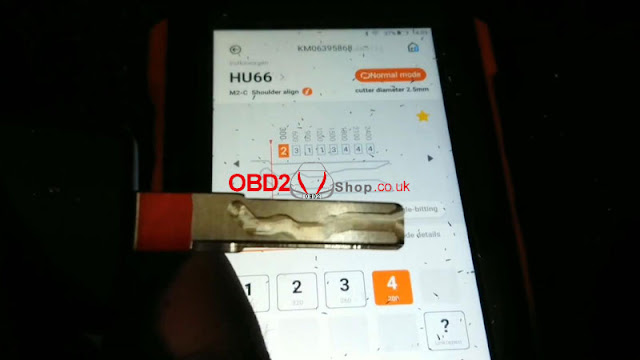
LISHI + Xhorse Dolphin XP005 Decode & Cut VW HU66 AKL

Use LISHI 2-in-1 Auto Pick working with Xhorse Dolphin XP005 can easily decode & cut a VW HU66 key when all keys lost. As long as you have a car lock, the LISHI decoder can extract it for cutting a new key.


Following this, I’m gonna demonstrate how to do it.


Decode Key

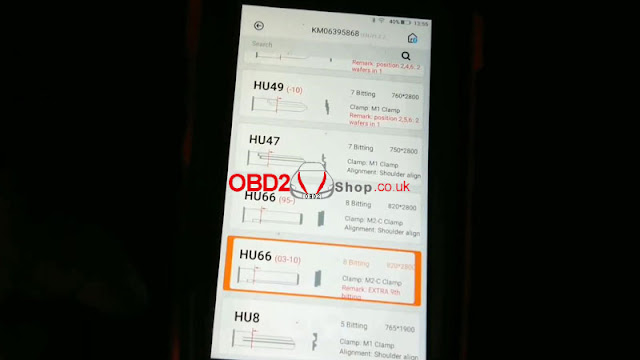
Firstly it needs to connect with the Dolphin XP005 machine via the Xhorse app or VVDI Key Tool MAX programmer. Enter into

Vehicle database >> Volkswagen >> All key blank >> HU66

lishi-xhorse-dolphin-xp005-decode-cut-vw-hu66-akl-1

lishi-xhorse-dolphin-xp005-decode-cut-vw-hu66-akl-2

lishi-xhorse-dolphin-xp005-decode-cut-vw-hu66-akl-3


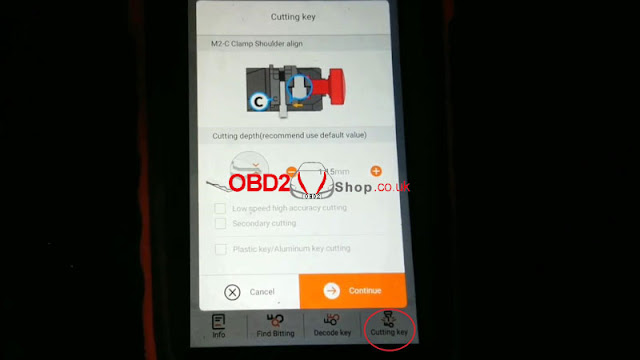
M2-C clamp shoulder align.

Install key blank as prompted.


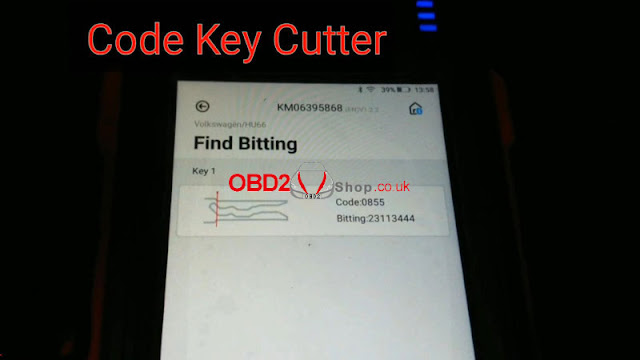
Input the codes decoded by LISHI: 23113444

Press “Find Bitting”.

A key type was displayed with code 0855, that’s it!

lishi-xhorse-dolphin-xp005-decode-cut-vw-hu66-akl-4

lishi-xhorse-dolphin-xp005-decode-cut-vw-hu66-akl-5

lishi-xhorse-dolphin-xp005-decode-cut-vw-hu66-akl-6

Cut Key

Cutting key >> Continue

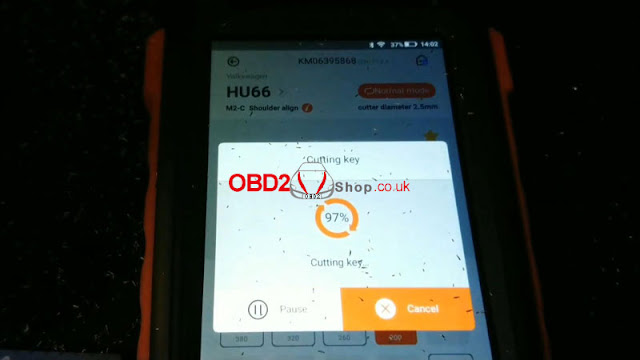
Dolphin XP005 will work automatically on command.

Just wait until 100%...

Cutting key completed.


Clean & turn over key to cut the other side.

Repeat same command as before.

Either Key Tool MAX or Xhorse Dolphin screen can show the cutting progress.

100% again, completed!

lishi-xhorse-dolphin-xp005-decode-cut-vw-hu66-akl-7

lishi-xhorse-dolphin-xp005-decode-cut-vw-hu66-akl-8

lishi-xhorse-dolphin-xp005-decode-cut-vw-hu66-akl-9

lishi-xhorse-dolphin-xp005-decode-cut-vw-hu66-akl-10

Let’s take it out to have a try.

It can open the lock.

Done!

lishi-xhorse-dolphin-xp005-decode-cut-vw-hu66-akl-11

lishi-xhorse-dolphin-xp005-decode-cut-vw-hu66-akl-12

It’s said new tool Xhorse Key Reader also supports decoding keys with ease. But it does not work for all keys lost, a key is a must-have. Believe having those tools can help locksmiths much.

http://blog.obd2shop.co.uk/lishi-xhorse-dolphin-xp005-decode-cut-vw-hu66-akl/

Tuesday, 7 December 2021

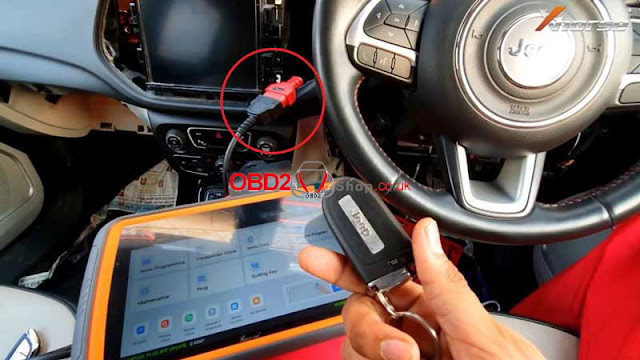
Xhorse VVDI Key Tool Plus Add Jeep Compass 2017+ Key Success

Xhorse VVDI Key Tool Plus Pad supports to add smart key for Jeep Compass 2017+ successfully. Need to connect with Xhorse FCA 12+8 Cable for programming. The 12+8 cable also allows programming Dodge 2018+, Chrysler 2018+. 

xhorse-vvdi-key-tool-plus-add-jeep-compass-2017-2021-key-success-01

For operation details, refer to the following:


Plug FCA 12+8 Cable to SGW, and connect with VVDI Key Tool Plus.


Immo programming >> Jeep >> Select from model >> Asia >> Compass >> 2017- >> Keyless go >> Start programming >> OK


We can check the number of key, it is currently 1 key.

xhorse-vvdi-key-tool-plus-add-jeep-compass-2017-2021-key-success-02


Program smart key >> OK


Switch ignition off, turn on the security warning light.


Make sure there are no wireless devices near the smart key.

Keep the smart key to be programmed close to the central console(or start button), then press and release UNLOCK button on the remote once and wait for 5s. Do not press any button during this time.


Note: the new key must be the original key of the current model, otherwise the program may fail.

Match successfully, current key number: 2.


Test all keys, all work well.


Done!

xhorse-vvdi-key-tool-plus-add-jeep-compass-2017-2021-key-success-03

xhorse-vvdi-key-tool-plus-add-jeep-compass-2017-2021-key-success-04

xhorse-vvdi-key-tool-plus-add-jeep-compass-2017-2021-key-success-05

This is how to use VVDI Key Tool Plus to do Jeep Compass 2017- key programming.


Article Source: http://blog.obd2shop.co.uk/xhorse-vvdi-key-tool-plus-add-jeep-compass-2017-key-success/


Wednesday, 10 November 2021

Xhorse Dolphin /Condor XC-MINI Cut House Key, Possible?

The answer is yes. With Xhorse M4 Clamp, it’s allowed to cut single & crucifix residential keys. M4 Clamp supports to work with Dolphin XP005, Dolphin II, CONDOR XC-MINI Plus automatic key cutting machines. 


But what’s worth mentioning is that M4 Clamp does not support cutting residential keys by code for the moment. You should have the original key to copy.


How to cut residential keys with an Xhorse key cutting machine?

This tutorial is taking Dolphin XP005 to cut SC1, KW1 keys as an example.


1. Tighten & install M4 Clamp. Prepare original key & new key, locate the alignment shim.

xhorse-dolphin-xp005-condor-xc-mini-cut-house-key-1


2. Go to “Universal Key Duplication >> Standard Single Sided >> Shoulder Align >> M4 Clamp”.

xhorse-dolphin-xp005-condor-xc-mini-cut-house-key-2

3. Insert & fix the original key, aligned it according to tips. Press “Decode key”.

xhorse-dolphin-xp005-condor-xc-mini-cut-house-key-3

xhorse-dolphin-xp005-condor-xc-mini-cut-house-key-4

4. Once completed, remove the original key and replace the new one as instructed. Press “Cutting key >> Continue”.

xhorse-dolphin-xp005-condor-xc-mini-cut-house-key-5


Xhorse Dolphin machine will finish the whole process automatically.

Just wait...

Universal key cutting success.

Done!

xhorse-dolphin-xp005-condor-xc-mini-cut-house-key-6

M4 Clamp can easily decode & cut SC1/KW1 keyways. Only to follow the steps above.


In short, Xhorse Dolphin XP005, Dolphin XP-005L, and Condor XC-Mini are able to cut by duplication for single/crucifix house keys.

xhorse-dolphin-xp005-condor-xc-mini-cut-house-key-7

xhorse-dolphin-xp005-condor-xc-mini-cut-house-key-8


http://blog.obd2shop.co.uk/xhorse-dolphin-condor-xc-mini-cut-house-key-possible/

Monday, 8 November 2021

Xhorse VVDI Key Tool Plus Add Porsche Key No Soldering

Xhorse VVDI Key Tool Plus is supported to add the Porsche 1N35H key without soldering. Just working with XDNPP17CH Solder-Free Adapters, it’s easy to be done. Following is the operation procedure.


Note: the Porsche BCM needs to be removed from the vehicle.


Generate Key on bench

Connect Porsche BCM, Solder-Free Adapter&VVDI Key Tool Plus together.

Prog >> IMMO >> Porsche >> Porsche >> BCM-1N35H-BACKUP >> Adapter >> Read >> D-FLASH >> Begin >> Continue


Read successfully.

Rename and save data files.

xhorse-vvdi-key-tool-plus-add-porsche-key-no-soldering-01

xhorse-vvdi-key-tool-plus-add-porsche-key-no-soldering-02

xhorse-vvdi-key-tool-plus-add-porsche-key-no-soldering-03

Put the key to be learned into the VVDI Key Tool Plus coil.


Immo programming >> Porsche >> New Porsche key-generate dealer key >> Start programming >> Generate key >> EEPROM(1N35H) >> Load EEPROM data >> Select blank key position: Key 3


Press “OK” to save new EEPROM data.


Generate key successfully.


Just refresh the newly saved file to the car.

You can also learn the new key to the car via OBD!

To add a key, please use the newly saved file to generate.

xhorse-vvdi-key-tool-plus-add-porsche-key-no-soldering-04

xhorse-vvdi-key-tool-plus-add-porsche-key-no-soldering-05

xhorse-vvdi-key-tool-plus-add-porsche-key-no-soldering-06

xhorse-vvdi-key-tool-plus-add-porsche-key-no-soldering-07

xhorse-vvdi-key-tool-plus-add-porsche-key-no-soldering-08

Learn Key via OBD

Reassembly the BCM back to Porsche.

Insert the working key into the ignition, press

New Porsche key - key learning >> Start programming >> Learn key >> Select new EEPROM data >> Input numbers of key to be learned


Observe the dashboard: 

When numbers turned from 02-00 to 02-01, which means 1 key was learned.

Pull out the key and insert the next key.


Just wait for processing...

All keys successfully learned.


Test the keys, both can work well.

Done!

xhorse-vvdi-key-tool-plus-add-porsche-key-no-soldering-09

xhorse-vvdi-key-tool-plus-add-porsche-key-no-soldering-10


Using Solder-Free Adapter + Key Tool Plus has saved me much time when programming Porsche keys.


Wednesday, 27 October 2021

Xhorse Key Reader 7 FAQs You Should Know

The latest key identification device Xhorse Key Reader has been released and can be pre-ordered now! Check the frequently asked questions and answers below to find what it can do.


Why Xhorse develop Key Reader?

3 significant features:

1. It’s able to identify aluminum keys, plastic keys as well as metal keys. It’s a bit troublesome to get the bitting code, so Key Reader greatly compensates for that. 

2. Probe breaking can be avoided. 

3. It’s much more accurate than taking a photo to identify key data.

xhorse-key-reader-7-faqs-you-should-know-1

xhorse-key-reader-7-faqs-you-should-know-2


Will Xhorse Key Reader work on APP?

Yes. 

1. Use a smartphone + key cutting machines like Dolphin XP005. By smartphone, you can obtain key bitting, then cut with the machine.

2. Use a key cutting machine with a screen like Condor XC-MINI Plus or Dolphin IIXP-005L. In this way, you can directly cut the key with simple clicks on the machine.

xhorse-key-reader-7-faqs-you-should-know-3

Dose Xhorse Key Reader support edge cut keys?

Yes. Just insert the key and click “Identification” on the screen. Key Reader will identify the key bitting codes automatically and show all key details.

xhorse-key-reader-7-faqs-you-should-know-4

xhorse-key-reader-7-faqs-you-should-know-5

xhorse-key-reader-7-faqs-you-should-know-6


Dose Xhorse Key Reader identifies HU162T?

Yes. HU162T is mainly for VW, Audi, Seat, Skoda cars. Though it’s a special metal key with 3 sides. For sure Key Reader Blade Skimmer is able to identify it.

xhorse-key-reader-7-faqs-you-should-know-7


Does Xhorse Key Reader identify Honda keys?

Definitely yes. It’s acknowledged that Honda keys tend to wear off easily. Yet you can still acquire accurate key bitting results.

xhorse-key-reader-7-faqs-you-should-know-8

Does Xhorse Key Reader support plastic/aluminum keys?

Sure. That’s the biggest advantage of the tool.

xhorse-key-reader-7-faqs-you-should-know-9

xhorse-key-reader-7-faqs-you-should-know-10

How much is it and when will it be available?

The pre-order price is £265, will arrive and deliver in December.

Order link: https://www.obd2shop.co.uk/wholesale/xhorse-key-reader.html


More questions welcome to contact us.

www.obd2shop.co.uk