Monday, 12 April 2021

Xhorse Condor XC-Mini Plus Copy a Key for Ford Focus(2011-)

How to use Xhorse Condor XC-Mini Plus key cutting machine to copy a key for Ford Focus(2011-)? 

Prepare an original key & a key blank to be cut.

Fix original key on clamp, keep it flat.


Press on Condor XC-Mini tablet screen, 

Key duplication >> Ford >> Focus >> Aus / Euro - LW(after 2011) >> Select key type, press “Confirm”>> Key decode

xhorse-condor-xc-mini-plus-copy-a-key-for-ford-focus-2011-1

xhorse-condor-xc-mini-plus-copy-a-key-for-ford-focus-2011-2

xhorse-condor-xc-mini-plus-copy-a-key-for-ford-focus-2011-3

xhorse-condor-xc-mini-plus-copy-a-key-for-ford-focus-2011-4

xhorse-condor-xc-mini-plus-copy-a-key-for-ford-focus-2011-5

xhorse-condor-xc-mini-plus-copy-a-key-for-ford-focus-2011-6

No parameters need to adjust, press “Confirm”.


The XC-Mini machine starts decoding...


Remove the original key and fix a key blank instead when the machine stopped.


Press “Cut”.

The XC-Mini machine starts cutting...


Wait until cutting finished.

Clean the iron scraps and take out the key.


It is the same key bitting as the screen, and it can open lock normally.

Key cutting was done!

xhorse-condor-xc-mini-plus-copy-a-key-for-ford-focus-2011-7

xhorse-condor-xc-mini-plus-copy-a-key-for-ford-focus-2011-8

xhorse-condor-xc-mini-plus-copy-a-key-for-ford-focus-2011-9

xhorse-condor-xc-mini-plus-copy-a-key-for-ford-focus-2011-10

xhorse-condor-xc-mini-plus-copy-a-key-for-ford-focus-2011-11

This is using Condor XC-Mini Plus automatic machine to cut a key for Ford Focus(2011-) successfully.

https://www.xhorse.co.uk/

Thursday, 8 April 2021

How Mini Prog Read & Transfer Data to Other Xhorse Device?

Today I wanna show you how to use Xhorse VVDI Mini Prog to read & transfer data to another Xhorse device.

How to read data?

1. Select chip model

Connect Mini Prog via Bluetooth in Xhorse app, press

EEPROM and FLASH >> ATMEL >> AT24CXX >> AT24C04(pressure) >> Read >> EEPROM


2. Read & save data

1. Clear the chip pin.

2. Connect Mini Prog adapter to the chip.

Press “Start operation”>> Continue >> Rename >> OK


how-mini-prog-read-transfer-data-to-other-xhorse-device-1

how-mini-prog-read-transfer-data-to-other-xhorse-device-2

how-mini-prog-read-transfer-data-to-other-xhorse-device-3

Save file successfully.


How to transfer data?

1. Upload data & synchronize

Go back to the main page, press 

File management >> Local file >> Find out data file, press “more”>> Upload >> Upload to here

Uploading 100%...

Upload success.


Go back to File management >> My data

Now you can find the data file here.

how-mini-prog-read-transfer-data-to-other-xhorse-device-4

how-mini-prog-read-transfer-data-to-other-xhorse-device-5

2. Download data

Go to http://i.xhorse.com/, scan PC OR code to quickly login.

Select the data file to download.

how-mini-prog-read-transfer-data-to-other-xhorse-device-6

how-mini-prog-read-transfer-data-to-other-xhorse-device-7

how-mini-prog-read-transfer-data-to-other-xhorse-device-8

Now you can share it or use for key programming directly.


Let’s login in same account to an Xhorse VVDI Key Tool Max.

You can find it in My data as well.

how-mini-prog-read-transfer-data-to-other-xhorse-device-9

how-mini-prog-read-transfer-data-to-other-xhorse-device-10

Transfer data succeed!


Using VVDI Mini Prog to read & transfer data is easy and convenient.

https://www.xhorse.co.uk/


Wednesday, 31 March 2021

What Xhorse tool for renew key?

Planning to start my trip with keys, and wanna know what Xhorse tool should I buy for renew key? I would like to start to renew used key, clean them and add to car - sell for others.


Xhorse tools that is able to renew keys:

Xhorse VVDI Key Tool Max with Renew Cable: yes (best coverage) 

vvdi key tool plus: yes

VVDI Mini Key Tool: Yes

key-tool-max-renew-01


Moreover, The question must be - What Tool$$$$


$ must buy. With one tool you can't start also you will need a cutting machine and a minimum of 1 year of learning.


And more advice:

I think maybe the best thing to do. 

Is to start with old PCB's from computers found on the junkyard. 

And just learn how to remove. Clean and solder back. 

EEPROM, microprocessors. 


It's free. Don't need expensive equipment. 

Low cost is OK. But need adjustable temperature, on the soldering iron.

And then need a lot of practice. 

And a low-cost set of solder tools.

Start with this a couple of months. 


And then move on to junkyard locks. 

dismantle into pieces.

Many different models, from different cars.

Work with this for a while. Its low cost.


After this, its OK to look at the rest.

And maybe get a programmer, or something.


https://www.xhorse.co.uk/


Sunday, 28 March 2021

Xhorse VVDI Key Tool Plus Program Keys for Suzuki Wagon R 2020

How to use Xhorse VVDI Key Tool Plus Pad to program 2 keys for Suzuki Wagon R 2020? Here is the procedure in details as below:


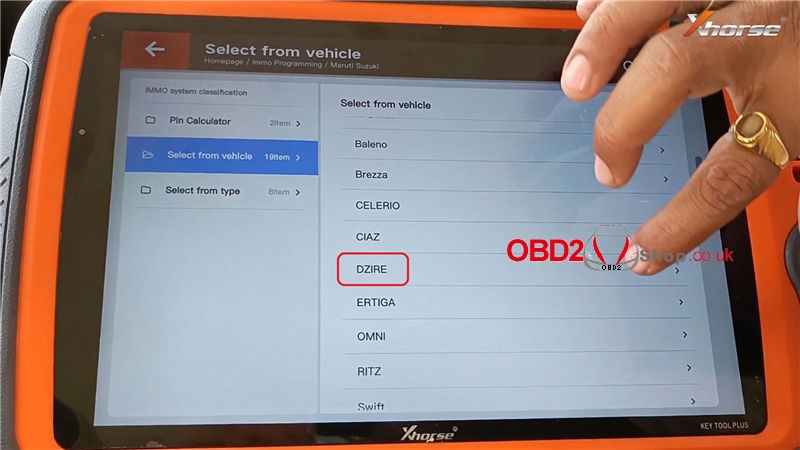
Connect Key Tool Plus with car OBD, press

Immo programming >> Maruti Suzuki >> Select from vehicle >> Dzire >> New Dzire >> Start programming >> Free pin code(old)

xhorse-vvdi-key-tool-plus-program-keys-for-suzuki-wagonr-2020-1

xhorse-vvdi-key-tool-plus-program-keys-for-suzuki-wagonr-2020-2

xhorse-vvdi-key-tool-plus-program-keys-for-suzuki-wagonr-2020-3

xhorse-vvdi-key-tool-plus-program-keys-for-suzuki-wagonr-2020-4

xhorse-vvdi-key-tool-plus-program-keys-for-suzuki-wagonr-2020-5

Connect the device to the network, press “OK”.


Send the following ID code to the makers to query the security code, press “OK”.


By calculating the authorization code online, please wait...


After performing this function, all keys will be erased. Press “OK” to continue.


Hold the new key where the logo on the remote is facing and touching the start/stop button with the key. Press “OK”.


Program is success, press “Yes” to program next one. 

xhorse-vvdi-key-tool-plus-program-keys-for-suzuki-wagonr-2020-6

xhorse-vvdi-key-tool-plus-program-keys-for-suzuki-wagonr-2020-7

xhorse-vvdi-key-tool-plus-program-keys-for-suzuki-wagonr-2020-8

xhorse-vvdi-key-tool-plus-program-keys-for-suzuki-wagonr-2020-9

Repeat same operations as before...


2 keys have been programmed, press “No” to finish.


Program is successful.

Press “OK” to complete.


Test the 2 keys, both remotes are well, and can start the engine normally.

xhorse-vvdi-key-tool-plus-program-keys-for-suzuki-wagonr-2020-10

xhorse-vvdi-key-tool-plus-program-keys-for-suzuki-wagonr-2020-11

xhorse-vvdi-key-tool-plus-program-keys-for-suzuki-wagonr-2020-12

Done!


This is using VVDI Key Tool Plus to program 2 keys for Suzuki Wagon R 2020 successfully.


Tuesday, 23 March 2021

Xhorse Dolphin XP005 Cuts a Honda RSX Key when All Key Lost

How to use the Xhorse Dolphin XP005 key cutting machine to make a Honda RSX key when all keys lost? Here is a quick demonstration I’ll show you.

Tools

A LISHI HON42/41 key reader

A Dolphin XP005 machine

A key blank to be cut

A smartphone installed with the Xhorse app


After calculation, the key bitting codes are: 11332312.

xhorse-dolphin-xp005-cuts-a-honda-rsx-key-when-all-key-lost-1

Procedure

Connect XP005 machine in Xhorse app, press


Customize key data >> Honda - RSX >> OK


Install M1 clamp as prompts, fix key blank flat on the clamp.

xhorse-dolphin-xp005-cuts-a-honda-rsx-key-when-all-key-lost-2

xhorse-dolphin-xp005-cuts-a-honda-rsx-key-when-all-key-lost-3

xhorse-dolphin-xp005-cuts-a-honda-rsx-key-when-all-key-lost-4

Input key bitting codes manually, press

Cutting key >> Cut


Dolphin XP005 machine starts cutting.

xhorse-dolphin-xp005-cuts-a-honda-rsx-key-when-all-key-lost-5

xhorse-dolphin-xp005-cuts-a-honda-rsx-key-when-all-key-lost-6

xhorse-dolphin-xp005-cuts-a-honda-rsx-key-when-all-key-lost-7

xhorse-dolphin-xp005-cuts-a-honda-rsx-key-when-all-key-lost-8

Wait processing until 100%...


Process complete, press “OK”.


Clean the metal debris, and take out the key to have a test.


It can open the lock.

Key cutting has done!

xhorse-dolphin-xp005-cuts-a-honda-rsx-key-when-all-key-lost-9

xhorse-dolphin-xp005-cuts-a-honda-rsx-key-when-all-key-lost-10

This is using Dolphin XP005 automatic machine to cut a Honda RSX key when all key lost successfully!

https://www.xhorse.co.uk/


Thursday, 18 March 2021

How to Read Hyundai/Kia ID46 Pin Code by VVDI Key Tool Max?

How to find ID46 pin code for key programming on a Kia or Hyundai vehicle when we have a working key? Today I’m gonna use the Xhorse VVDI Key Tool Max to do it. 


I’m in a 2012 Hyundai Sonata, this is a working key in the Key Tool Max coil.


Make sure Key Tool Max is connected to the Internet, press

Transponder clone >> Read transponder >> Clone >> Start clone >> Kia/Hyundai password


The Key Tool Max is going to read information from this key in depth...


read-hyundai-kia-id46-pin-code-by-vvdi-key-tool-max-1

read-hyundai-kia-id46-pin-code-by-vvdi-key-tool-max-2

At this point we need to sniff data from the vehicle, and you’re going to sniff that data using the working key and the programming slot if the vehicle has one. If the vehicle doesn’t have a programming slot, then you would sniff this data with the key from the push to start button. That will depend on what type of vehicle you have.


So I recommend selecting “Original key clone - long-distance sniffer”.


Open the armrest here, place the Key Tool Max as close to the programming slot as we can get it. Insert the working key and as you can see, the Key Tool Max was able to get the data sniffed from the vehicle.


And now it’s asking to put the original key back into the Key Tool Max coil.


Wait for a while...


Calculate success.

The pin code has been calculated.

read-hyundai-kia-id46-pin-code-by-vvdi-key-tool-max-3

So now you can use the pin code and program the duplicate key to this vehicle. You don’t have to get the password by some other means.


Using VVDI Key Tool Max to calculate pin code from a working key on 2012 Hyundai Sonata successfully!

https://www.xhorse.co.uk/


Monday, 15 March 2021

Xhorse Condor XC-Mini Cut Toyota TOY43 Key When All Keys Lost

How to use Xhorse Condor XC-Mini Plus key cutting machine to cut a TOY43 key for Toyota when all key lost? Today I wanna cut by bitting to finish the job.

Having calculated Toyota key buttings from lock, here we go to start.

xhorse-condor-xc-mini-cut-toyota-toy43-key-all-key-lost-1

Press on Condor XC-Mini tablet screen:

Cut by bitting >> TOY43

Select key type:

Key ID: 940

Key width: 820

Cuts: 10

Cut depth: 0.00mm

Car maker: Toyota

xhorse-condor-xc-mini-cut-toyota-toy43-key-all-key-lost-2

xhorse-condor-xc-mini-cut-toyota-toy43-key-all-key-lost-3

xhorse-condor-xc-mini-cut-toyota-toy43-key-all-key-lost-4

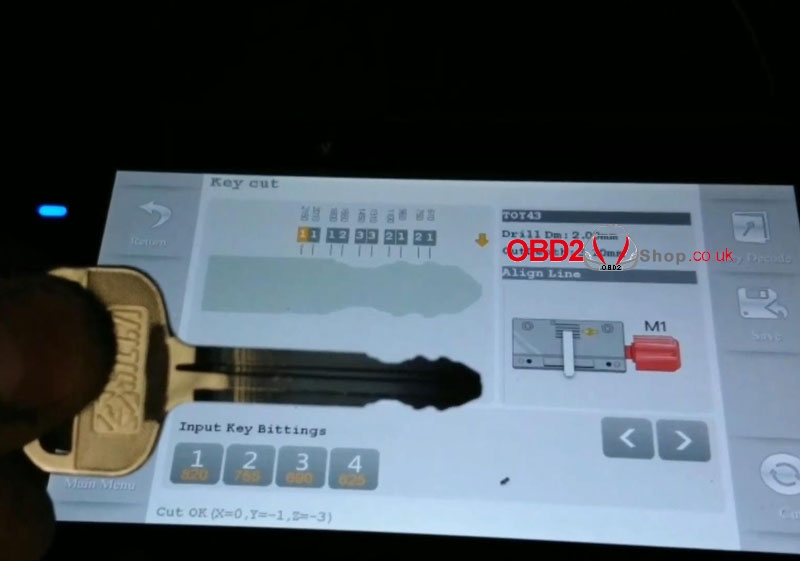
Input cut bittings: 12332121

Fix the key blank on clamp, make it flat and tight.

Press “Cut”, XC-Mini machine starts cutting...

xhorse-condor-xc-mini-cut-toyota-toy43-key-all-key-lost-5

xhorse-condor-xc-mini-cut-toyota-toy43-key-all-key-lost-6

xhorse-condor-xc-mini-cut-toyota-toy43-key-all-key-lost-7

xhorse-condor-xc-mini-cut-toyota-toy43-key-all-key-lost-8


Take out the key when cutting finished.

It is with same bittings as TOY43 on screen, also, it can open the Toyota lock.

Done!

xhorse-condor-xc-mini-cut-toyota-toy43-key-all-key-lost-9

xhorse-condor-xc-mini-cut-toyota-toy43-key-all-key-lost-10

Using Condor XC-Mini Plus automatic machine to cut a Toyota TOY43 key by bitting successfully!

http://blog.obd2shop.co.uk/xhorse-condor-xc-mini-cut-toyota-toy43-key-all-key-lost/