Wednesday, 15 September 2021

Programming Lexus 570 2012 Key by VVD MAX + Obdstar X300 Pro4

How to unlock & add smart key for a Lexus 570 2012? This is using Xhorse VVDI Key Tool Max and Obdstar X300 Pro4 to do it.


  • VVDI Key Tool Max Unlock Lexus 570 Key

Put the new Lexus key into the VVDI Key Tool Max coil slot, press

Special function >> Unlock Toyota smart key >> Unlock

Unlock OK.

VVDI Key Tool Max Unlock Lexus 570 Key


  • Obdstar X300 Pro4 Program Lexus Key 570 Key

Connect X300 Pro4 with car OBD, press

Diag program >> Toyota Lexus >> Toyota/ Lexus V32.20 >> Select from type >> Proximity >> Type 1 >> Program smart key


Note: each procedure has to complete within the specified time.


Put a working key close to ignition switch, and turn it ON till the dashboard is lit on.

You’ll hear buzzer beeps once.

Obdstar X300 Pro4 Program Lexus Key 570 Ke 01

 Obdstar X300 Pro4 Program Lexus Key 570 Ke 02

 Obdstar X300 Pro4 Program Lexus Key 570 Ke 03

Use a new smart key to contact START button.

Program success.


Test the keys, both can work well.

Key programming has done!

Obdstar X300 Pro4 Program Lexus Key 570 Ke 05

 Obdstar X300 Pro4 Program Lexus Key 570 Ke 06

Use VVDI Key Tool Max working with Obdstar Key Master 5 to unlock & program a new key for 2012 Lexus 570 successfully.

http://blog.obd2shop.co.uk/xhorse-key-tool-max-obdstar-x300-pro4-unlock-add-lexus-570-2012-key/


Thursday, 9 September 2021

(Solved!)Xhorse VVDI2 Volvo 93С66 pcf7935 key 4 5 6 not available Problem

Problem: Xhorse VVDI2 Volvo V70 1998- with 93С66 and pcf7935. When loading eeprom data, free positions 4, 5 and 6 are not available for writing. How to solve this issue?

VVDI2 Volvo 93С66 pcf7935 key 4 5 6 not available


Xhorse senior engineer replied:

Just generate key from 1,2,or 3 position. No need write back data to immobox if using together with Super Chip XT27A01 XT27A66 Transponder; if using together with the original key, need to write back data to immobox.


Alright, Xhorse VVDI2 tech support: http://blog.xhorse.co.uk/


Tuesday, 24 August 2021

How to Check Xhorse Key Tool Plus Mercedes Benz / VW Tokens?

How to view the tokens for Mercedes Benz and VW MQB with Xhorse VVDI Key Tool Plus in step by step.


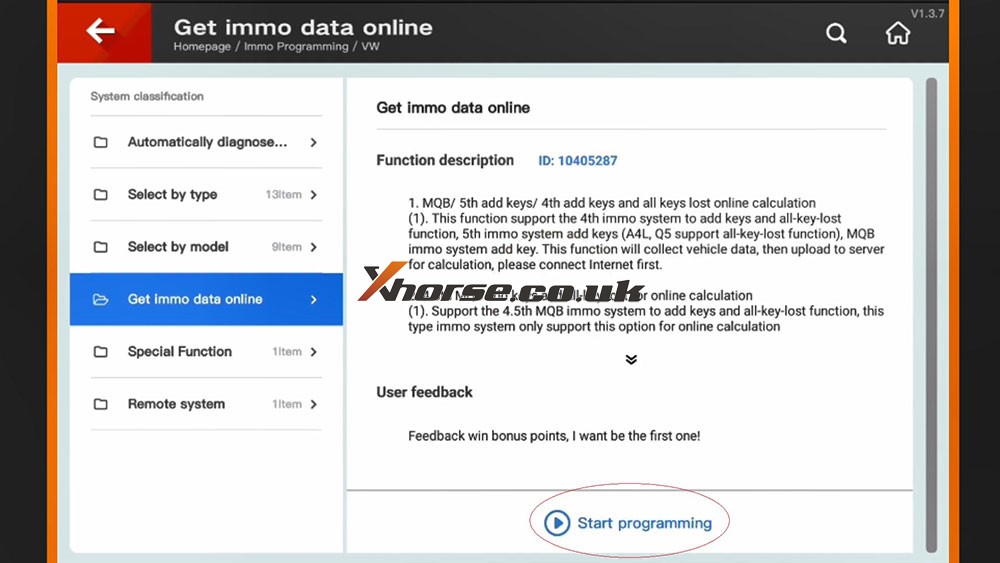
Part 1. How to View MQB Online Tokens with VVDI Key Tool Plus

Immo programming -> VW -> Get immo data online -> Start programming -> Balance inquiry

How to check MQB Online Tokens with VVDI Key Tool Plus 01

 How to check MQB Online Tokens with VVDI Key Tool Plus 02

 How to check MQB Online Tokens with VVDI Key Tool Plus 03

 How to check MQB Online Tokens with VVDI Key Tool Plus 04

How to check MQB Online Tokens with VVDI Key Tool Plus 05

Part 2. How to View M Mercedes Benz Tokens with VVDI Key Tool Plus

Immo programming -> Benz -> Select from system -> Password calculation -> Start programming -> Query the Benz points -> here you will see how many times for free calculation, how many times for paid calculation, how many bonus.


How to check MQB Online Tokens with VVDI Key Tool Plus 06

How to check MQB Online Tokens with VVDI Key Tool Plus 07

How to check MQB Online Tokens with VVDI Key Tool Plus 08

How to check MQB Online Tokens with VVDI Key Tool Plus 09


PS: You can get Key Tool Plus for Mercedes Benz Password Calculation Token at here:
https://www.xhorse.co.uk/wholesale/1-token-for-vvdi-key-tool-plus-password-calculation-for-sn-vk08.html

Wednesday, 4 August 2021

Generate Super Chip ID47 using Xhorse VVDI Key Tool Max Tutorial

Xhorse VVDI Key Tool Max is able to generate Super Chip ID47 successfully.

Generate Super Chip ID47 using Xhorse VVDI Key Tool Max 01


Put the super chip ID47 into the coil of VVDI Key Tool Max.


Tap "Generate Transponder" and then "ID47"

Generate Super Chip ID47 using Xhorse VVDI Key Tool Max 02


Tap "New 7938 chip" and then "Generate".

Generate Super Chip ID47 using Xhorse VVDI Key Tool Max 03

Generate Super Chip ID47 using Xhorse VVDI Key Tool Max 04

Detecting transponder

Generate Transponder Complete.

Generate Super Chip ID47 using Xhorse VVDI Key Tool Max 05


Then tap "ID47 Blank" and "Generate".

Generate Super Chip ID47 using Xhorse VVDI Key Tool Max 06


Detecting transponder

Generate Transponder Complete.


Back to the home menu and select "Read Transponder".

Generate Super Chip ID47 using Xhorse VVDI Key Tool Max 07


Alright, ID47 is unlocked and cloneable.

Generate Super Chip ID47 using Xhorse VVDI Key Tool Max 08


Xhorse VVDI Key Tool Max did a good job.


http://blog.xhorse.co.uk/


Thursday, 29 July 2021

How to fix Xhorse VVDI Key tool "DEF" not back to normal

To fix the problem Xhorse vvdi Key tool “DEF” not back to normal likes below:

Xhorse VVDI Key tool "DEF" not back to normal 01

Xhorse VVDI Key tool "DEF" not back to normal  02

Xhorse VVDI Key tool "DEF" not back to normal  03

 
,You may try: 


Method 1. And just put it in English that returns to normal.
Method 2.Reinstall by computer, and select English language
Method 3.Reupdate and make sure there is no break in communication during update.


Good to know:

VVDI Key tool is off-production and replaced by VVDI Mini Key Tool, but they are still releasing updates.


http://blog.xhorse.co.uk/xhorse-vvdi-key-tool-def-not-back-to-normal-solution/

Tuesday, 27 July 2021

Xhorse VVDI PROG Pinout for Opel, Ford PSA etc

Opel Insignia 2011 year

Body R/W VVDI PROG

Pinout for all of you

Mask 2M42E

MC9S12XDG128MAL

vvdi-pro-body-insignia-2m42e–eep 01

vvdi-pro-body-insignia-2m42e–eep 02

 vvdi-pro-body-insignia-2m42e–eep 03

vvdi-pro-body-insignia-2m42e–eep 04

 vvdi-pro-body-insignia-2m42e–eep 05

VVDI PROG Ford fiesta 2017 Pinout

VVDI PROG Ford fiesta 2017 Pinout


VVDI PROG PSA SPC560 Pinout

VVDI PROG PSA SPC560 Pinout


Renault / Dacia SPC560

Pinout xprog edit for vvdi
Test ok

Renault / Dacia SPC560 01
Renault / Dacia SPC560 02


Opel SPC 56AP54x
Pinout CPT edit for vvdi prog

Renault / Dacia SPC560 03


Fiat 500 L
MPC/SPC
CPT edit for vvdi prog

Renault / Dacia SPC560 04


Dacia / Renault v2
pinout CPT edit for VVDI prog
Dacia / Renault v2 pinout CPT edit for VVDI prog 04


Dacia /Renault v3
pinout CPT edit for vvdi prog

Dacia /Renault v3 pinout CPT edit for vvdi prog


Skoda SPC5604-114pin
pinout CPT edit for VVDI prog

Skoda SPC5604-114pin pinout CPT edit for VVDI prog


Kia NEC
pinout CPT edit for VVDI prog

Kia NEC pinout CPT edit for VVDI prog


VW renesas v850
pinout CPT edit for VVDI prog

VW renesas v850 pinout CPT edit for VVDI prog


Citroen C3 SPC560

Citroen C3 SPC560


MB_W222_SRS_SPC560P5_jtag

MB_W222_SRS_SPC560P5_jtag


Suzuki_SRS_SPC560P50_pinout

Suzuki_SRS_SPC560P50_pinout


Chrysler MPC SRS

Chrysler MPC SRS


Source:http://blog.xhorse.co.uk/vvdi-prog-pinout-for-opel-ford-psa-etc/


Replace/Program XHORSE ELV emulator with VVDI MB

In case Mercedes Benz W204/ W207/ W212 EIS is damaged, not matter the ESL is damaged or NEC is locked, it’ll require to replace a new ESL emulator.


How to replace Xhorse ELV Emulator with VVDI MB Tool?


l Check ESL

Open the VVDI MB Tool to check ESL.


ESL Tools >> Read ESL data >> Check ESL damage

It’ll show the ESL status.

ESL is locked!(maybe damaged!)And the key can’t turn on the dashboard.

That means the ESL is damaged, you should replace a new one.

Replace/Program XHORSE ELV emulator with VVDI MB 01
Replace/Program XHORSE ELV emulator with VVDI MB 02
Replace/Program XHORSE ELV emulator with VVDI MB 03

l Replace ESL

Replace the damaged simulator with Xhorse ESL Emulator/ VVDI MB Mini ELV Emulator.

(Note: If you can’t open the meter, you can use instrument for the commonly used ones.)


1. Read & save EIS data

Go back to read EIS data.

Reading data success. EIS is normal.


Go to “Erase Password”, click “Get”.

Get its password, then paste to the “Key Password”.

Then save EIS data.

Replace/Program XHORSE ELV emulator with VVDI MB 04


Replace/Program XHORSE ELV emulator with VVDI MB 04
2. Load EIS data

Plug in the analog key to renew ELS.

Then load backup data in MB Tool.

Replace/Program XHORSE ELV emulator with VVDI MB 05


3. Test the ESL

Insert the key to turn on the instrument.

Done!

Replace/Program XHORSE ELV emulator with VVDI MB 06


This is a how to use VVDI MB Tool to replace Benz C300 W207 2006 ELV emulator.

http://blog.xhorse.co.uk/